Solved Calls rejected.

Status
Not open for further replies.

GageC

Free User
Joined
Dec 11, 2021
Messages
6
Reaction score
6
Calls out of Teams to any extension ring for a second or two, then fail with the message "Declined". I've attached several logs, I have removed a lot of redundent information from the following logs to reduce the overall size, there's a space between each log, if you want me to send the full version just ask. I'm sure I've misconfigured something, I don't have any trunks configured, and calls from any of my IP Phones or 3CX mobile clients to any extensions with teams configured don't respond on teams. For the phone numbers, I just put random numbers or personal cell numbers.

Photo of status of SBC inside Teams admin center.
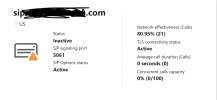
Screen Shot 2021-12-10 at 11.52.04 PM.png

Error inside Teams client.
Screen Shot 2021-12-10 at 11.40.02 PM.png

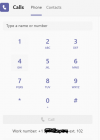
Image of the keypad inside Teams client, doesn't seem to include extension number at the end of it, despite adding it to the end of the number via power shell command.
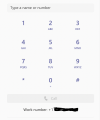
Screen Shot 2021-12-10 at 11.40.10 PM.png

Image to show that my three users are properly licensed.
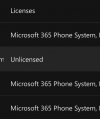
Screen Shot 2021-12-10 at 11.40.16 PM.png

Assigned User policies, exact same for each user.
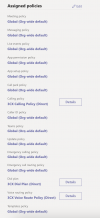
Screen Shot 2021-12-10 at 11.40.59 PM.png

Photo of 3CX Extensions.
Screen Shot 2021-12-10 at 11.41.08 PM.png

Code:
[Unknown:] Sending: OnSendResp Send 603/INVITE from 0.0.0.0:0
SIP/2.0 603 Decline
To: <sip:[email protected]:5061;user=phone>;tag=18c9ef27
From: "Gage"<sip:+PHONE NUMBER [email protected]:5061;user=phone>
Warning: 499 sip.REDACTED.com "Caller is forbidden"

Terminated from "Gage"<sip:+PHONE NUMBER [email protected]:5061;user=phone> to <sip:[email protected]:5061;user=phone> reason: Rejected

[Unknown:] is terminated: Cause: BYE from PBX

[CM503013]: Call(C:8): Incoming call rejected, caller is unknown
INVITE sip:[email protected]:5061;user=phone;transport=tls SIP/2.0
To: <sip:[email protected]:5061;user=phone>
From: "Gage"<sip:+PHONE NUMBER [email protected]:5061;user=phone>
User-Agent: Microsoft.PSTNHub.SIPProxy v.2021.12.1.4 i.USWE2.1
P-Asserted-Identity: <tel:+PHONE NUMBER REDACTED>
P-Asserted-Identity: <sip:[email protected]>
 
Have same problem, MS Powershell cmdlet Set-CsUser in 3cx script (mapusers) work incorrect (maybe MS change this cmdlet behavior).

For example, command "Set-CsUser -Identity [email protected] -OnPremLineURI "tel:+111;ext=111" -EnterpriseVoiceEnabled $true -HostedVoiceMail $true" set OnPremLineURI to "tel:+111", so ext field dont filled (ext=111).

You can try command Set-CsPhoneNumberAssignment -Identity [email protected] -PhoneNumber "+111;ext=111" -PhoneNumberType DirectRouting
 
  • Like
  • Love
Reactions: Cutshaw and GageC
Have same problem, MS Powershell cmdlet Set-CsUser in 3cx script (mapusers) work incorrect (maybe MS change this cmdlet behavior).

For example, command "Set-CsUser -Identity [email protected] -OnPremLineURI "tel:+111;ext=111" -EnterpriseVoiceEnabled $true -HostedVoiceMail $true" set OnPremLineURI to "tel:+111", so ext field dont filled (ext=111).

You can try command Set-CsPhoneNumberAssignment -Identity [email protected] -PhoneNumber "+111;ext=111" -PhoneNumberType DirectRouting
The phone number assigned to users in their "Office Phone" MUST BE E164.

That's probably your issue right there.

Follow the guide.
 
It worked a month ago with the same numbers, but when i run script yesterday - calls between 3cx and Teams rejected.

And as i said, command "Set-CsPhoneNumberAssignment -Identity [email protected] -PhoneNumber "+111;ext=111" -PhoneNumberType DirectRouting" solved my problem.
 
The phone number assigned to users in their "Office Phone" MUST BE E164.

That's probably your issue right there.

Follow the guide.
That was a rather ignorant thing to say.


Have same problem, MS Powershell cmdlet Set-CsUser in 3cx script (mapusers) work incorrect (maybe MS change this cmdlet behavior).

For example, command "Set-CsUser -Identity [email protected] -OnPremLineURI "tel:+111;ext=111" -EnterpriseVoiceEnabled $true -HostedVoiceMail $true" set OnPremLineURI to "tel:+111", so ext field dont filled (ext=111).

You can try command Set-CsPhoneNumberAssignment -Identity [email protected] -PhoneNumber "+111;ext=111" -PhoneNumberType DirectRouting
The command you listed worked immediately, calls in and out to my IP phones and teams now work and it also properly lists the extension under teams! Thanks a bunch! 3CX really should update their scripts, Microsoft definitely changed the syntax and made them invalid.
 
Last edited:
  • Like
Reactions: Cutshaw and amaxx
That was a rather ignorant thing to say.
There's a guide and people don't follow it to the letter and then get issues... what do you want me to do? Tell them "go ahead"? As a 3CX Partner, our goal is to keep people in a supported realm. Not venture outside of it.

So, just as a note to everyone reading this, the solution proposed (while seems to work now) is not the supported nor intended way to configure it. The Teams user's "Office Phone" should be set to a full E164 number (preferably their Outbound Caller ID, which can also be synced from that field) in order for the integration to work as expected. While other ways work at the moment, this could change anytime in the future from either MSFT or 3CX side.
 
There's a guide and people don't follow it to the letter and then get issues... what do you want me to do? Tell them "go ahead"? As a 3CX Partner, our goal is to keep people in a supported realm. Not venture outside of it.

So, just as a note to everyone reading this, the solution proposed (while seems to work now) is not the supported nor intended way to configure it. The Teams user's "Office Phone" should be set to a full E164 number (preferably their Outbound Caller ID, which can also be synced from that field) in order for the integration to work as expected. While other ways work at the moment, this could change anytime in the future from either MSFT or 3CX side.
Full e164 number not working with old cmdlet either (ext field dont filled).
For example:
Set-CsUser -Identity [email protected] -OnPremLineURI "tel:+7495111111;ext=111" -EnterpriseVoiceEnabled $true -HostedVoiceMail $true
 
There's a guide and people don't follow it to the letter and then get issues... what do you want me to do? Tell them "go ahead"? As a 3CX Partner, our goal is to keep people in a supported realm. Not venture outside of it.

So, just as a note to everyone reading this, the solution proposed (while seems to work now) is not the supported nor intended way to configure it. The Teams user's "Office Phone" should be set to a full E164 number (preferably their Outbound Caller ID, which can also be synced from that field) in order for the integration to work as expected. While other ways work at the moment, this could change anytime in the future from either MSFT or 3CX side.
Both of us used a legitimate, and correct full e164 number in the commands. Just because the included examples did NOT have one, doesn't mean we didn't use one.This is currently the correct and only way to get the direct calling working because microsoft has changed the commands and made the provided 3CX scripts invalid. They need to be updated ASAP for new customers.
 
  • Like
Reactions: Cutshaw
Hi everyone!

From preliminary testing, the command mentioned above seems to be specific for just adding the number to the user, but the "Set-CsUser" should do that as well. On existing users, the existing command seemed to do the trick.
On a brand new user however, it seems like the new command might be required.

We shall be looking into this= and I will try to keep this thread updated.
 
Have same problem, MS Powershell cmdlet Set-CsUser in 3cx script (mapusers) work incorrect (maybe MS change this cmdlet behavior).

For example, command "Set-CsUser -Identity [email protected] -OnPremLineURI "tel:+111;ext=111" -EnterpriseVoiceEnabled $true -HostedVoiceMail $true" set OnPremLineURI to "tel:+111", so ext field dont filled (ext=111).

You can try command Set-CsPhoneNumberAssignment -Identity [email protected] -PhoneNumber "+111;ext=111" -PhoneNumberType DirectRouting
This worked for me as well! Spent hours on this and after finding this post all is well again :) Thanks!!
 
  • Like
Reactions: Cutshaw and GageC
This worked for me as well! Spent hours on this and after finding this post all is well again :) Thanks!!
Worked instantly, 3CX support told me I had to rerun my users' script or redo my whole integration from scratch, ran this script and users were properly mapped in Teams. Immediate results, Great job!
 
  • Like
Reactions: GageC
@Christopher E Cutshaw @amaxx @GageC @nsh

We are looking into this, but in the meantime one very important question, after you ran the User Script, how long did you wait before running this other command that we are discussing here?

More specifically, did you wait at least 24h?

We are getting mixed results with the MS365 accounts we have for testing, that's why I am asking.
(we can only have so many...)
 
  • Like
Reactions: Cutshaw
@Christopher E Cutshaw @amaxx @GageC @nsh

We are looking into this, but in the meantime one very important question, after you ran the User Script, how long did you wait before running this other command that we are discussing here?

More specifically, did you wait at least 24h?

We are getting mixed results with the MS365 accounts we have for testing, that's why I am asking.
(we can only have so many...)
We did wait the 24 hours. What happened and never resolved was the fact that my users had no extensions mapped to them, when they presented in a SIP transaction they were being rejected as unknown (the outbound calls) until I ran the script @nsh mentions. After that I want to say the fix was immediate and you could see on the dial pad in teams on the bottom that their work number was showing with their extension next to it.

you can also see here in the call log before I ran the script calls being rejected as unknown
 

Attachments

  • DialPadTeamsFixed.PNG
    DialPadTeamsFixed.PNG
    13.1 KB · Views: 22
  • calls rejected unknown.PNG
    calls rejected unknown.PNG
    10.6 KB · Views: 21
Last edited:
We did wait the 24 hours. What happened and never resolved was the fact that my users had no extensions mapped to them, when they presented in a SIP transaction they were being rejected as unknown (the outbound calls) until I ran the script @nsh mentions. After that I want to say the fix was immediate and you could see on the dial pad in teams on the bottom that their work number was showing with their extension next to it.

you can also see here in the call log before I ran the script calls being rejected as unknown
Thank you for the info!
 
  • Like
Reactions: Cutshaw
@Christopher E Cutshaw @amaxx @GageC @nsh

We are looking into this, but in the meantime one very important question, after you ran the User Script, how long did you wait before running this other command that we are discussing here?

More specifically, did you wait at least 24h?

We are getting mixed results with the MS365 accounts we have for testing, that's why I am asking.
(we can only have so many...)
I only spent maybe two hours overall working with direct calling with teams, from start to finish. It was recognized in my teams client immediately, so there wasn't a reason to wait. It only properly showed the extension and started working normally after I ran the command NSH proposed.
 
I only spent maybe two hours overall working with direct calling with teams, from start to finish. It was recognized in my teams client immediately, so there wasn't a reason to wait. It only properly showed the extension and started working normally after I ran the command NSH proposed.
exactly
 
  • Like
Reactions: GageC
I only spent maybe two hours overall working with direct calling with teams, from start to finish. It was recognized in my teams client immediately, so there wasn't a reason to wait. It only properly showed the extension and started working normally after I ran the command NSH proposed.
Just to be clear, so you didn't wait 24h, but directly after running the "Set-CsPhoneNumberAssignment -Identity........" command, everything started working, right?
 
Just to be clear, so you didn't wait 24h, but directly after running the "Set-CsPhoneNumberAssignment -Identity........" command, everything started working, right?
Correct.
 
  • Like
Reactions: NickD_3CX
Just to add another update. I had a user jack with their work phone number properties in AD. That caused their outbound calls to start rejecting again. So, I ran the script again from NSH to repair their account with the correct phone number / extension and their calling was fixed almost immediately.
 
  • Like
Reactions: GageC
Status
Not open for further replies.