Solved Can not access the management console

Status
Not open for further replies.

raquatics

New User
Joined
Aug 10, 2022
Messages
17
Reaction score
1
Hi, I do not have the administrator e-mail address I got theses e-mail

3CX Communications System - 3CX <[email protected]>​


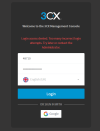
Is this the correct e-mail but when I try to login to the management console I get this error - please see attached! :)
 

Attachments

  • 3CX Login blocked.png
    3CX Login blocked.png
    22.3 KB · Views: 19
Your IP is blocked because of to many failed logins. Your not the administrator of the 3CX? Are you sure that you have the rights to access the management console?
 
On StartUP, you do not have access to the management console.
 
  • Like
Reactions: bitn2
I should have access as I am the administrator I will check other e-mails and see if that solves the issue but I am confused to why I don't have access
 
Thank you both for your responses I will keep you updated
 
Than you need to use the admin account and not your client id. But at the moment you need to change your ip first, because your blocked.
 
I should have access as I am the administrator I will check other e-mails and see if that solves the issue but I am confused to why I don't have access
Not necessarily. If you have your own instance yes, but StartUP is on a cloud platform controlled by 3CX. You must use the Webclient to edit users and settings.
 
Not necessarily. If you have your own instance yes, but StartUP is on a cloud platform controlled by 3CX. You must use the Webclient to edit users and settings.
correct, where is your 3cx installed?
 
it is hosted by 3CX and it is installed on my laptop, I have checked my e-mails and can not find anything relating to the admin just how to log in with the extension, I am now feeling like I have done something incorrect at some stage. I am so confused and I am unsure what I have missed.
 
What? Hosted by 3cx AND installed on your laptop? What product do you habe vom 3CX?
 
I have the 3CX StartUP PRO 10 Users
 
Ahh, than you dont have acces to the admin console. Please login at the webclient.
 
Ok so panic over then so does this mean I can not set up the SIP Trunk or does it just get setup in the weclient?
 
You need to setup everything at your webclient. Did you read anything before you orderd your 3CX? Ist your sip trunk compatible?
 
  • Like
Reactions: Evolute IT
Yeah it all works it's a provider that is 1 of two that I can use with 3CX just on their setup it has where you can input the name of the outgoing call ID but i'm guessing as I don't have access to the management console that can not be changed
 
You need to read some stuff... Its sounds like you didnt check what ist possible with 3cx and how to do it. On Startup you need to configure evertything with your webclient, your sip trunk as well. Which provider do you want to use?
 
  • Like
Reactions: Evolute IT
I am using T4COM i've added the Trunk I can call out but can't call in it states the user is offline so I am guessing I have missed some configuration there or does it need to be a link or QR code for incoming calls via just web calls and not through a static line?
 
@raquatics

You should be able to find some useful information on how to get started with StartUP in our StartUP guide here.
 
Status
Not open for further replies.

Members Online Now

Forum statistics

Threads
111,831
Messages
589,277
Members
164,660
Latest member
RJenkinsROCK