Can you mix: Cloud hosted + on-prem

Status
Not open for further replies.

regomotiv

Premier Customer
Basic Certified
Joined
Sep 15, 2009
Messages
90
Reaction score
1
5 locations, 4 are running off a cloud hosted instance of v18.
The 5th location has an old v12 on-prem.

I want to migrate this 5th location in 3 segments, which means v12 (phones are Yealink T28) & v18 (Yealink T54W) will run concurrently on the same network.
I installed a vm Linux SBC because I could not get router phone to register.

The T54's are showing up (in discovery) on the old v12.

What am I doing wrong.
Thanks.
 
Why would you keep the v12 system? I would think it would be best to move them to v18, then you wont have this type of problem.
 
The router phone didn’t register because you likely have dhcp66 on that lan. Remove that.
Upgrade the v12 to v18. Likely have to rebuild it.
On Prem v18 can talk to cloud v18 without issues.
 
I do not have option 66 on the dhcp server.
The v12 is going away completely!
 
You can use the T28 phones on a cloud installation but because they are old they can not be provisioned securely. So you need to configure them manually and also specify the SBC. Here is the manual configuration guide.

https://www.3cx.com/sip-phones/yealink-t20p-t22p-t26p-t28p/

If we are talking just a few phones it would be better to buy new ones.If you have a lot of phones you can do this for a while - of course there is some security risk to using such old phones but only you can calculate the risk thereof...
 
  • Like
Reactions: Evolute IT
I am doing the cloud "cutover" in 3 stages, but, I am definitely not keeping any of the T28's.
They are all getting replaced by T54W's.
 
They are not bad phones, its just they are old and cant connect via SSL securely. So depends what is in that network whether its an issue or not...... If its just 2-3 phones definitely replace them immediately.

If its 100 phones maybe you can get by if you have a good firewall in place.
 
  • Like
Reactions: Alejandro_3CX
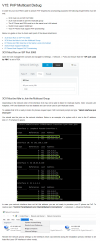
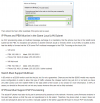
It's all about multicast here. The reason the new phones (T54W) are showing up on v12 and not on the SBC is the v12 server is receiving the multicast pnp packet and the SBC isn't.

You can just skip PNP and setup the phone in the 3CX management console, then copy/paste the URL into the phone UI and provision button.

EDIT: Fix bad spelling
 
Last edited:
In short, yes, but you will need some non 3cx knowledge.

This old article should help you:
1693360285591.png
1693360292590.png
 
  • Like
Reactions: regomotiv
I appreciate the detail. Thank you!
 
Status
Not open for further replies.

Forum statistics

Threads
111,974
Messages
590,081
Members
164,899
Latest member
mazet