


- Joined
- Mar 22, 2026
- Messages
- 1
- Reaction score
- 0
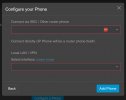
I'm having a problem, I know a router phone or SBC is required for cloud service, and have run into a few posts from others mentioning this in response to the problem I'm having, but this dialog box (below) seems the place where you WOULD configure a router phone, or SBC like any other compatible phone, and that is just not possible as it responds to nothing - you cannot select the option circles (on the left - very dim), you cannot drop down any menu, you cannot type. You can't even click the "learn more" link in the dialog box - nothin'! I'm having a hard time believing the UX Design team at 3Cx decided that making this dialog useless and offering no way to click 'learn more' has anything to do with having a router phone / SBC or not.
Logic would have it, if the above is true, that you'd have to add your IP router phone elsewhere, not in the "Configure a Phone" section as if you WERE supposed to add one here, you simply could not, you'd have the same issue. It simply does not function, no matter what you may want to add.
I've tried on various systems and browsers, same thing - no way to add a phone, router or otherwise. Is this just no longer available from free cloud users?
I'd love to know what's really going on here with some details about how to resolve it. Is adding a hardware phone possible at all using free?
Thanks!
Logic would have it, if the above is true, that you'd have to add your IP router phone elsewhere, not in the "Configure a Phone" section as if you WERE supposed to add one here, you simply could not, you'd have the same issue. It simply does not function, no matter what you may want to add.
I've tried on various systems and browsers, same thing - no way to add a phone, router or otherwise. Is this just no longer available from free cloud users?
I'd love to know what's really going on here with some details about how to resolve it. Is adding a hardware phone possible at all using free?
Thanks!


