Cannot install 3CX v20 on Windows - Letsencrypt pfx password wrong

Status
Not open for further replies.

wesThreecx

Customer
Joined
Mar 8, 2024
Messages
55
Reaction score
7
Greetings,

We are installing a new 3CX install and it is v20 on a Win11 Pro VM, with our own custom fqdn.

When we get to upload the WINACME generated PFX file, we are told the password is wrong.

The workaround was to uninstall v20, install v18 and choose a legacy install method....we used the PFX file and same password without issue.

Anyone got any thoughts on why this might be - we do need to do some v20 installs soon.

Thank you in advance for any useful insight.
 
Just to clarify - the PFX would not import on v20 but it would import on v18.
 
You're likely experiencing a compatibility issues with your SSL certificate in PFX format, converting it to PEM format can work.

Convert PFX to PEM with your PC Using OpenSSL (Not 3CX Directly)

Step 1: Install OpenSSL

  1. Download OpenSSL: Download OpenSSL for Windows. To do this, search for "Download OpenSSL for Microsoft Windows" on Google. You should find it easily and quickly.
  2. Install OpenSSL: Follow the installation instructions, during the installation, you will encounter an option to ‘Add OpenSSL to your system PATH’. Make sure to select this option.

Step 2: Access Command Prompt
  1. Open Command Prompt by pressing Windows + R, typing cmd, and pressing Enter.

Step 3: Navigate to Your PFX File
  1. Change to the directory containing your PFX file using:
    Code:
    cd path\to\your\pfxfile

Step 4: Convert Your PFX to PEM
  1. Extract the Private Key:
    Code:
    openssl pkcs12 -in yourfile.pfx -nocerts -out privatekey.pem -nodes
  2. Extract the Certificate:
    Code:
    openssl pkcs12 -in yourfile.pfx -clcerts -nokeys -out certificate.pem
  3. Extract the CA Certificates (if included):
    Code:
    openssl pkcs12 -in yourfile.pfx -cacerts -nokeys -chain -out cacerts.pem

Step 5: Verify the Conversion
  1. Ensure the files privatekey.pem, certificate.pem, and cacerts.pem are correctly generated in your directory.

Additional Tips:
  • Always store your PEM files securely.
  • If your PFX file is password-protected, you will be prompted for the password during conversion.

Step 6: Merge the certificate and the CA
Code:
copy /b certificate.pem+cacerts.pem bundlecerts.pem


Step 7: Test the validity of your certificate
  • Search Google for "Red Kestrel CSR Decoder and Certificate Decoder".
  • Navigate to their website and upload the file named bundlecerts.pem.
  • Check the results. If everything looks good, proceed to use it with 3CX.


Step 8: Test the validity of your certificate

Try again with 3CX v20. If it works, please let us know.
If it does not work, please share a screenshot of the error, making sure to obscure any sensitive information if there is any.
  • When 3CX requests the private certificate, select privatekey.pem.
  • When asked for the public certificate, choose bundlecerts.pem.


Good luck !
 
  • Like
Reactions: Evolute IT
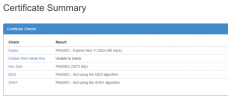
Thank you for the advice - the openssl worked and Red Kestrel read the bundle

All the PEMs reported invalid.....original pfx could be read but password was not accepted....even though it is accepted in v18 and by openssl....

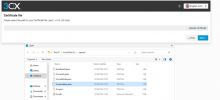
3cx1.png3cx2.png
 

Attachments

  • 3cx3.png
    3cx3.png
    33.2 KB · Views: 12
Just as a test I thought I would see if the same happened on Linux - it did not. v20 of 3CX accepted the pfx and password.

We do not do Linux so this is not a workable solution. How do we go about getting the Windows v20 to work? Do 3CX review issues on the forum and investigate?

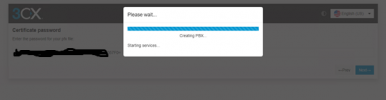
3cx4.png
 
Good afternoon, I appreciate everyone is busy, just wandering if there is a way to get 3CX v20 installed on Windows with a custom FQDN - all my attempts failed. Slightly ironic, having never used Linux in any form ...for over 30 years ... it installs fine with the same custom FQDN.
 
Good afternoon, I appreciate everyone is busy, just wandering if there is a way to get 3CX v20 installed on Windows with a custom FQDN - all my attempts failed. Slightly ironic, having never used Linux in any form ...for over 30 years ... it installs fine with the same custom FQDN.
I would use linux, its very easy to use also when your not a linux pro. The only thing you habe to figure out is to renew your own certificates on linux.
 
I would use linux, its very easy to use also when your not a linux pro. The only thing you habe to figure out is to renew your own certificates on linux.
Using Linux in production is not an option, the pros and cons are surfaced once in a while and for us, Windows is always chosen. Seems on this occassion we have no workaround, 3CX v18 installs on Windows but 3CX v20 will not...with all other parameters remaining the same....the issue being that the pfx file password is reported as incorrect by v20....which it cannot be.
 
Using Linux in production is not an option, the pros and cons are surfaced once in a while and for us, Windows is always chosen.
Linux with 3cx is a lot more easy to maintain than windows... But anyway, open a support ticket with your partner to look further.
 
  • Like
Reactions: Guillaume Bourgeois
Using Linux in production is not an option, the pros and cons are surfaced once in a while and for us, Windows is always chosen. Seems on this occassion we have no workaround, 3CX v18 installs on Windows but 3CX v20 will not...with all other parameters remaining the same....the issue being that the pfx file password is reported as incorrect by v20....which it cannot be.

I understand your policy of wanting everything on Windows, but do you realize this is costing you more on Windows?

You are paying for a Windows license. The resources required to run 3CX are higher.

3CX requires an 3CX ENTERPRISE license to run the 3CX PBX product on Windows. (You will pay more at the next renewal).

Using Windows 11 is not a good idea because Windows forces updates without giving 3CX time to ensure compatibility and stability.

It's no coincidence that the majority of PBX systems do not run on Windows, e.g., Asterisk, Yeastar, Wazo, etc.

Therefore, if installing on Linux directly is not an option, I at least recommend using HyperV. You'll have a Windows layer and 3CX on Linux in a virtual machine.
It's not ideal but better than directly on Windows.

Consider that 3CX does not accept any OS modifications, you must disable antivirus on Windows, disable automatic updates (which Windows forces anyway), and use only one network card... whether it's Windows or Linux.
Do not install any other services and especially not a softphone.
You have nothing to lose by being on Linux, nothing to gain by being on Windows.

Regardless, if you absolutely want to be on Windows and is urgent, it's not very complicated—just get your certificates in .pem format and it will work.

I will bring this to the attention of a 3CX staff member; perhaps they are already aware of the issue with pfx certificates, with password… on 3CX PBX Windows OS.

@nikolascx
 
I understand your policy of wanting everything on Windows, but do you realize this is costing you more on Windows?

You are paying for a Windows license. The resources required to run 3CX are higher.

3CX requires an 3CX ENTERPRISE license to run the 3CX PBX product on Windows. (You will pay more at the next renewal).

Using Windows 11 is not a good idea because Windows forces updates without giving 3CX time to ensure compatibility and stability.

It's no coincidence that the majority of PBX systems do not run on Windows, e.g., Asterisk, Yeastar, Wazo, etc.

Therefore, if installing on Linux directly is not an option, I at least recommend using HyperV. You'll have a Windows layer and 3CX on Linux in a virtual machine.
It's not ideal but better than directly on Windows.

Consider that 3CX does not accept any OS modifications, you must disable antivirus on Windows, disable automatic updates (which Windows forces anyway), and use only one network card... whether it's Windows or Linux.
Do not install any other services and especially not a softphone.
You have nothing to lose by being on Linux, nothing to gain by being on Windows.

Regardless, if you absolutely want to be on Windows and is urgent, it's not very complicated—just get your certificates in .pem format and it will work.

I will bring this to the attention of a 3CX staff member; perhaps they are already aware of the issue with pfx certificates, with password… on 3CX PBX Windows OS.

@nikolascx
Thank you Guillaume,

I have over 30 years of experience with Windows. This particular environment is virtualised with HyperV and has all the required licensing.

Costs - the cost of the 3CX licence is insignificant when considering TCO, moreoever the Enterprise licence is required for this site.

All the supporting infrastructure and management of is based on a Windows model and is very well supported.

I followed the steps about generating a PEM and it made no difference - I posted details of my experience with this earlier in the thread.
 
[…]

I followed the steps about generating a PEM and it made no difference - I posted details of my experience with this earlier in the thread.


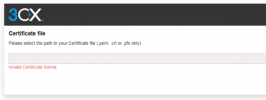
On this page, you should upload the certificate bundle.

3cx2-png.43207


Is it not working?


If so, since it's Let's Encrypt, why not generate the certificates directly in the .pem format, without password ?

Alternatively, could you tell me how you generated your pfx certificate?

I will replicate the process on my side, I conduct some tests, and I will open a support ticket with 3CX support, if I can reproduce.
 
On this page, you should upload the certificate bundle.

3cx2-png.43207


Is it not working?


If so, since it's Let's Encrypt, why not generate the certificates directly in the .pem format, without password ?

Alternatively, could you tell me how you generated your pfx certificate?

I will replicate the process on my side, I conduct some tests, and I will open a support ticket with 3CX support, if I can reproduce.
Correct - 3CX reports invalid certificate format for the bundle PEM, which is valid according to RedKestrel.

We use WINACME / IIS to generate the certificates - up until this point this has worked on many v18 Windows installs, as well as for other https services. We copy the pfx from the WINACME programdata directory
 
Status
Not open for further replies.

Forum statistics

Threads
111,953
Messages
589,915
Members
164,850
Latest member
masvty