Yes, it’s possible that this could be the cause of the problem. I’ve often encountered similar issues with IPv6 when the network doesn’t fully support it (and doesn’t support NAT64).
Before making any changes, I recommend taking a full backup of your system (or a snapshot if possible). While this works fine for us, I wouldn’t want you to be upset with me if it doesn’t give the same result.
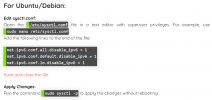
On Linux, to disable IPv6, use this command:
Bash:
clear && ip -6 addr show | grep inet6 >/dev/null && echo "" && echo "Currently active IPv6 addresses before modification:" && echo "" && ip -6 addr show | grep inet6 && echo "" && (echo "net.ipv6.conf.all.disable_ipv6 = 1" | sudo tee -a /etc/sysctl.conf > /dev/null && sudo sysctl -p > /dev/null && echo "IPv6 now disabled." && echo "" && ip -6 addr show | grep inet6 || echo "No IPv6 addresses found after modification." && echo "") || echo "No IPv6 addresses found before modification, skipping disable." && echo ""
Here’s a detailed breakdown of what each part of the previous commands line does:
1.
- Clears the terminal to ensure a clean start.
2.
Code:
ip -6 addr show | grep inet6 >/dev/null
- Checks for active IPv6 addresses silently.
3.
- Adds a blank line for spacing.
4.
Code:
echo "Currently active IPv6 addresses before modification:"
- Informs the user about the output context.
5.
Code:
ip -6 addr show | grep inet6
- Displays the active IPv6 addresses.
6.
- Inserts a blank line after the IPv6 addresses.
7. Command Block:
- Executes if IPv6 addresses are found:
-
Adds disable rule to sysctl.conf and reloads config
-
Displays "IPv6 now disabled."
-
Checks again for IPv6 addresses and reports if none are found
8. No IPv6 check:
- If no IPv6 addresses are found initially:
Code:
echo "No IPv6 addresses found before modification, skipping disable."
9. Final blank line:
- Adds a blank line for a clean conclusion.
When done, reboot your system