Cannot renew SSL manually

chikara sugiyama

Customer
Joined
Jun 15, 2014
Messages
47
Reaction score
5
Hello.

I have been unable to renew my SSL, so I set "TEMPORARY_SELF_SIGNED_CERTIFICATE_GENERATED" to "1", then I tried to run "/usr/lib/3cxpbx/PbxConfigTool -renew-certificates" via SSH in the Root. However, an error message "3cxpbx.sync is locked" is displayed and I cannot execute it.

This was not a problem in V18, but after updating to V20, I am unable to do so.

Is there a solution?
 
Connect to your machine via SSH and try to reach the servers using the following commands:

ping activate.3cx.com
ping downloads-global.3cx.com

Do you receive a response? If yes, what are the response IP addresses?
 
  • Like
Reactions: jed
It looks like I get a good resolution & response with ipv4 but not with ipv6 resolutions. I can disable ipv6 for the VM, but is there another concern separate from these results? Or is there something specific that may be needed for ipv6 beyond the standard setup (perhaps due to Azure)?

activate.3cx.com:
Bash:
$ ping activate.3cx.com
PING activate.3cx.com(2606:4700:4400::ac40:98ed (2606:4700:4400::ac40:98ed)) 56 data bytes
^C
--- activate.3cx.com ping statistics ---
11 packets transmitted, 0 received, 100% packet loss, time 10232ms


$ ping -4 activate.3cx.com
PING  (172.64.152.237) 56(84) bytes of data.
64 bytes from 172.64.152.237 (172.64.152.237): icmp_seq=1 ttl=55 time=7.81 ms
64 bytes from 172.64.152.237 (172.64.152.237): icmp_seq=2 ttl=55 time=7.78 ms
64 bytes from 172.64.152.237 (172.64.152.237): icmp_seq=3 ttl=55 time=7.76 ms
64 bytes from 172.64.152.237 (172.64.152.237): icmp_seq=4 ttl=55 time=7.99 ms
^C
---  ping statistics ---
4 packets transmitted, 4 received, 0% packet loss, time 3003ms
rtt min/avg/max/mdev = 7.759/7.833/7.992/0.092 ms

downloads-global.3cx.com:
Bash:
$ ping downloads-global.3cx.com
PING downloads-global.3cx.com(2606:4700:4400::6812:2313 (2606:4700:4400::6812:2313)) 56 data bytes
^C
--- downloads-global.3cx.com ping statistics ---
5 packets transmitted, 0 received, 100% packet loss, time 4096ms

$ ping -4 downloads-global.3cx.com
PING  (104.18.35.19) 56(84) bytes of data.
64 bytes from 104.18.35.19 (104.18.35.19): icmp_seq=1 ttl=55 time=10.9 ms
64 bytes from 104.18.35.19 (104.18.35.19): icmp_seq=2 ttl=55 time=9.71 ms
64 bytes from 104.18.35.19 (104.18.35.19): icmp_seq=3 ttl=55 time=9.09 ms
64 bytes from 104.18.35.19 (104.18.35.19): icmp_seq=4 ttl=55 time=9.00 ms
^C
---  ping statistics ---
4 packets transmitted, 4 received, 0% packet loss, time 3004ms
rtt min/avg/max/mdev = 9.002/9.666/10.868/0.745 ms
 
3CX is fully functional and supports IPv6, but in your case, it seems that Azure requires specific configurations.

Personally, I almost always disable IPv6. You should start there.

Take a snapshot of your VM and screenshots of your modifications to facilitate a rollback if it breaks something else.
 
  • Like
Reactions: jed and Evolute IT

Resolved!

The IPv6 public IP address assigned to the IP configuration on the Azure-hosted VM was accidentally deleted by another admin while cleaning up another system (a test HA pair).

I took a moment to upgrade the existing IPv4 address from basic to standard (those who have legacy deployments in Azure - you have until 9/30 to move from basic to standard) and created a new IPv6 address, and assigned it to the secondary (IPv6) configuration. I rebooted the server and could ping with IPv4 and IPv6 to the two URIs you provided earlier.

I was then able to run the manual renewal script. It failed the first time (a note about permissions to a directory, but I neglected to save it) but succeeded the second time by running it again.
 
  • Like
Reactions: jed
I successfully ran the sudo -u phonesystem /usr/lib/3cxpbx/PbxConfigTool -renew-certificates and sudo 3CXStopServices && sudo 3CXStartServices
But the certificate is still expired. Do I need to reboot or wait longer?
 
Is it a 3CX FQDN?

First, you need to log in to the 3CX interface,
go to Admin > Advanced > Parameters.

Add or modify the parameter:
TEMPORARY_SELF_SIGNED_CERTIFICATE_GENERATED
Set the value to 1.
Restart the 3CX services.

Then, run the following command:
Bash:
sudo /usr/lib/3cxpbx/PbxConfigTool -renew-certificates


If this still doesn’t work,

Please let us know:

- What is the version of your 3CX PBX (including the build number)?
- When you ping these addresses, what response do you get?

ping activate.3cx.com
ping downloads-global.3cx.com

Do you receive a response? If yes, what are the response IP addresses?

Is your license expired?

If you run this command via SSH:
Bash:
echo -e "\n\n$(for ip in v4 v6; do curl -s https://discover$ip.3cx.com/getip; echo; done)\n\n"

Do the returned IPs match those shown on your dashboard?
 
Last edited:
Hi Guillaume, same problem, my pbx went offline for a couple of days and the certificate expired.
I followed all the instructions you posted, but the certificate does not renew. I reach both activate.3cx.com and downloads-global.3cx.com and the license has not expired.
The version is 20.0 Update 3 (Build 806 Release)
 
Bash:
echo -e "\n\n$(for ip in v4 v6; do curl -s https://discover$ip.3cx.com/getip; echo; done)\n\n"

Do you receive one IPv4 address and one IPv6 address?

What router (firewall) is positioned in front of your PBX?
 
I successfully ran the sudo -u phonesystem /usr/lib/3cxpbx/PbxConfigTool -renew-certificates and sudo 3CXStopServices && sudo 3CXStartServices
But the certificate is still expired. Do I need to reboot or wait longer?
Afterward, I did nothing, and the SSL automatically renewed overnight. It must wait 24 hours and trigger from the 3CX head office side.
 
Bash:
echo -e "\n\n$(for ip in v4 v6; do curl -s https://discover$ip.3cx.com/getip; echo; done)\n\n"

Do you receive one IPv4 address and one IPv6 address?

What router (firewall) is positioned in front of your PBX?
Hi,
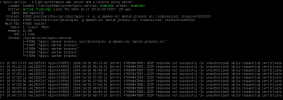
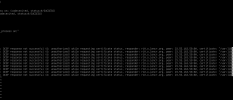
only ipv4 and no firewall. The service status of nginx shows this error:

1729244358978.png
1729244373453.png
 
Generate a support file,
Upload it to your OneDrive or Google Drive.
Send me the download link in a private message.

I will review the logs.
 
This morning I tried to do a fresh install and restore the backup on a different IP and it worked, the certificate renewed
 

Forum statistics

Threads
111,955
Messages
589,925
Members
164,855
Latest member
parik24pro