Solved Cannot set up new SBC

Status
Not open for further replies.

sooperdave5

SMB User
Joined
Jun 4, 2025
Messages
5
Reaction score
2
Hello,

I am new to 3CX and set up an SBC earlier, for some reason it went down so I uninstalled it from my Raspberry Pi 5 and attempted to set up a new one.

Every time I try I get this error:

sudo bash -c "$(wget -qO- http://downloads-global.3cx.com/downloads/sbc/3cxsbc.zip)"

connecting to https://1742.3cx.cloud
warning: Cannot obtain provisional data
The PBX does not accept the SBC AUTHENTICATION KEY ID
[Authentication Key ID]
Installation aborted

Things I've tried:
  • Making multiple SBC's to connect to one of them
  • Stopping the service and restarting the Pi
  • Deleting the original service
  • And probably some other things
 
are you using the old credentials from first SBC you deleted?
 
  • Like
Reactions: KyriacosS_3CX
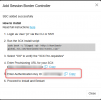
To clarify, when adding the Pi SBC you get the below. Then start the installation but you paste the Authentication key and it fails on authentication?
1749017359256.png
 
Yes, I create a new one on the dashboard, run the install script, enter the URL and then enter the newly generated key and I get the error every time
 
I've tried installing a SBC on a different device on my network and I'm still getting the same error. At this point I'm convinced its a 3CX issue because my IP got blacklisted, apparently there's no way to fix that other than wait so ill try again tomorrow.
 
I've tried installing a SBC on a different device on my network and I'm still getting the same error. At this point I'm convinced its a 3CX issue because my IP got blacklisted, apparently there's no way to fix that other than wait so ill try again tomorrow.
Please ensure the phones you are trying to provision run the correct 3CX-supported firmware. Also, ensure that you select the SBC (Session Border Controller) as the method during the provisioning process.

We recommend performing a factory reset on the phones and removing them from the assigned extension until the SBC is fully connected and operational.
 
Please ensure the phones you are trying to provision run the correct 3CX-supported firmware. Also, ensure that you select the SBC (Session Border Controller) as the method during the provisioning process.

We recommend performing a factory reset on the phones and removing them from the assigned extension until the SBC is fully connected and operational.
Thanks but I'm not trying to provision any devices at the moment, just trying to set the SBC up
 
Thanks but I'm not trying to provision any devices at the moment, just trying to set the SBC up
First, please remove the phones from their assigned extensions and perform a factory reset on each device to avoid interference during setup.

If the IP phones are not configured correctly, they may trigger security mechanisms and cause the IP to be blacklisted. Once the phones are reset and disconnected, proceed with provisioning the SBC
 
  • Like
Reactions: KyriacosS_3CX
Hey this issue is fixed now thanks for everyone's help, I just checked my 3CX dashboard and I wasn't blacklisted anymore, so without changing anything else I attempted setting up the SBC again and it worked. For anyone else who comes across this, the issue was 100% just that my IP was temporarily blacklisted (the same IP that I was setting up the SBC on) and so the Raspberry Pi wouldn't of been able to communicate with 3CX's servers and finish set up until the block was removed.
 
Good to know this is resolved.
Ensure always to configure the SBC first and then add the ip phones to the network.
 
Status
Not open for further replies.

Members Online Now

Forum statistics

Threads
111,831
Messages
589,277
Members
164,660
Latest member
RJenkinsROCK