- Joined
- Feb 27, 2024
- Messages
- 6
- Reaction score
- 1
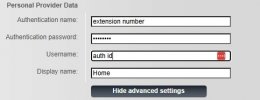
I have a Google cloud install of 3CX PRO, and I have SBC on location to handle local phones (Windows 11). I can connect to the PBX using the 3CX client and admin login info, but when I try to connect with a IP phone (Gigaset Comfort 550 IP) I can't get it to work. This phone used to connect to my PBX when the PBX was on the Amazon network, so I know it can. It used to connect directly, not needing the SBC. But since switching the PBX to the Google platform, I can't get it to work no matter if I try via the SBC or direct.
After switching the event viewer to Verbose, I can confirm that the phone is trying to connect, but is receiving an authentication failed. I am using the same login information and can login to the web console with the information, so I know the username and password is correct.
I have already tried:
After switching the event viewer to Verbose, I can confirm that the phone is trying to connect, but is receiving an authentication failed. I am using the same login information and can login to the web console with the information, so I know the username and password is correct.
07/01/2025 12:43:57.168 AM [CM102001]: Authentication failed for AuthFail Recv Req REGISTER from 127.0.0.1:5080 tid=4837ddaf8c3ee254da500c8ec059d5ab Call-ID=471057963@192_168_1_***: REGISTER sip:127.0.0.1:5060;transport=UDP SIP/2.0 Via: SIP/2.0/UDP 127.0.0.1:5080;branch=z9hG4bK-524287-2---4837ddaf8c3ee254da500c8ec059d5ab;rport=5080 Via: SIP/2.0/UDP ***Removed for security***:51589;branch=z9hG4bK-524287-1---tunneltid;rport;tnlid=sbc.8a47a512 Via: SIP/2.0/UDP 192.168.1.***:5060;branch=z9hG4bK4837ddaf8c3ee254da500c8ec059d5ab;rport=5060 Max-Forwards: 68 Record-Route: <sip:[email protected]:5080;user=proxy;uri=sbc.8a47a512> Record-Route: <sip:[email protected].***:5060;user=proxy;tnlid=sbc.8a47a512> Contact: <sip:**@192.168.1.***:5060> To: Home<sip:**@***Removed for security***>
From: Home<sip:**@***Removed for security***>;tag=1752676644 Call-ID: 471057963@192_168_1_*** CSeq: 33 REGISTER Expires: 180 Allow: INVITE, ACK, CANCEL, BYE, OPTIONS, INFO, SUBSCRIBE, NOTIFY, REFER, UPDATE Proxy-Authorization: Digest username="**",realm="3CXPhoneSystem",algorithm=MD5,uri="sip:***Removed for security***",nonce="414d53590003d58045:a2f8af636110eee805c9e8c7ebfc2310",response="4a34927c66e3cb02070a546aa459c99f" User-Agent: COMFORT 5xx IP/42.263.00.000.000 Content-Length: 0 ; Reason: Credentials don't match, check that authorization-ID and password match the ones in extension settings
I have already tried:
- Creating a new extension
- Resetting password
- Setting and removing the SIP ID to see if this would change anything
- Tried logging in with both Extension ID and email
- Tried connecting directly and via SBC (above log is via SBC). Both give authentication failed with the same reason