Can't see all the admin options (Owner)

lior111999

SMB User
Joined
Jun 22, 2025
Messages
5
Reaction score
0
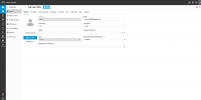
Hi. Why can't I see all the options and all the actions I can take? I'm set as Owner, and I still can't access all the services. Why? What can I do to fix this?

Thanks in advance, Lior
 
  • Like
Reactions: Evolute IT
Check/show Voice&Chat.

You don’t have access to security settings on a free account as that would be server wide.
 
Check/show Voice&Chat.

You don’t have access to security settings on a free account as that would be server wide.
Security is less important to me, it's more important to me to have the SIP Trunks option in the admin. This option is free, right? Because as you can see it doesn't appear for me along with many other options.

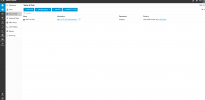
Regarding Voice&Chat, here's a screenshot I took:

Admin2.png
 
So… Add Trunk. ;)
 
  • Like
Reactions: Evolute IT
So… Add Trunk. ;)
It seems to me that SIP Trunk should have appeared in the Admin menu regardless of whether I logged into Voice&Chat, at least that's how it looks in the YouTube videos.

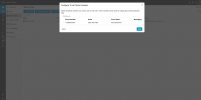
In any case, I would be very happy if you could help me with something. I have a Twilio user with a virtual number and a real number, everything is verified and everything is fine. I am trying to attach the number to 3CX so that I can have a SIP Trunk in 3CX. It tells me that it is being used somewhere else (probably in Twilio).

The problem is that before I adjusted the Twilio settings, it would tell me that the number exists but is not being used. Now it tells me that it is being used somewhere else. How can I still attach it to 3CX? I would be very grateful if you could help me with this, this is what I need and I have not been able to do it so far. Thank you very much and I am waiting for your answer.

Here is a screenshot I took of the problem:

Admin3.png


Thank you.
 
I would appreciate some help please on how to attach the number from Twilio to a SIP Trunk in 3CX. I am really desperate for help. Everything I have tried has not worked :(
 
Hi,

As you see that number seems to already be part of an existing Twilio trunk. The Auto-Setup wizard tries to create a new trunk, and will move that number to this new trunk.
https://www.3cx.com/docs/sip-trunk/twilio/

If you are not using the existing Twilio trunk anywhere and want to avoid having multiple trunks with them, delete the one you have via the twilio portal, keep your number, and have the 3CX wizard create a new trunk for you.

If you get a paid licence you have the option of connecting to an existing twilio trunk, but the SMB free version will only allow the wizard mode that creates a new trunk every time
It seems to me that SIP Trunk should have appeared in the Admin menu regardless of whether I logged into Voice&Chat, at least that's how it looks in the YouTube videos.
Youtube videos go out of date too. Voice&Chat has been the home for SIP Trunk and all external connections for V20, so a few years now.
.
 
  • Like
Reactions: Evolute IT

Members Online Now

No members online now.

Forum statistics

Threads
111,831
Messages
589,277
Members
164,660
Latest member
RJenkinsROCK