CFD - Match customer record and send email

Status
Not open for further replies.

robmango

Bronze Partner
Advanced Certified
Joined
May 9, 2023
Messages
20
Reaction score
4
I'm wondering if the below would be possible using CFD. We've got a use case for this scenario so might have a chance to get this demonstrated and later implemented.

- Customer calls in and is prompted to enter a customer ID
- This ID is then matched in a database
- The caller is then prompted to leave a message which will be transcribed using Google text to speech.

Is it then possible for CFD to email this transcribed text to a nominated email address?

And, as the customer ID has been matched in the previous steps, could the customer email address be inserted into the 'from' section of the email sender?

1708008961098.png

I'm hoping to point theses emails directly at a helpdesk, with the customer email address populated so there will be no need for editing before replies.
 
  • Like
Reactions: Plains_JosephW
If the API/database has the email, yes you can set it as From but be aware that this can create lot of issues with SPF/DKIM/DMARC. You would be best to use a generic From and set the customer email in the Reply-To header.

And yes you can transcribe using the Record component and the Transcribe Audio component. Record to a WAV somewhere, and in the disconnect flow, grab that WAV path (use flow variables for path and customer ID/email) and transcribe/send the email from there. This way, people can hang up after recording their message and it will still send automatically.
 
  • Like
Reactions: VoIPTools
Thanks, have you got any examples of the transcribe audio component setup?

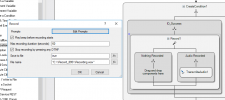
I've set the record component as;

1709045156626.png

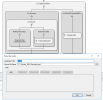
Then the transcribe component as;

1709045199060.png

Where do I go after this, how do I send the transcribed audio?
 
The Transcribe Audio component provides the RecognizedText property. You should use it in your email sender component.
 
Thanks, where do I add the RecognizedText property/variable? I've added it before using c# code component, but I don't have one of these in this setup...
 
  • Like
Reactions: Evolute IT
Thanks, i've got it working now.

I would like to use an smtp server to send the email. I'm using the 3CX server connection settings at the moment.

I've been trying to use gmail but less secure apps can't be enabled. Can you suggest another smtp service?
 
Thanks, i've got it working now.

I would like to use an smtp server to send the email. I'm using the 3CX server connection settings at the moment.

I've been trying to use gmail but less secure apps can't be enabled. Can you suggest another smtp service?
SMTP2Go
 
  • Like
Reactions: robmango
Thanks!! It's working well.

Can I put more information/variables in the body of the email? I've already validated the caller with an ID number, matched from a database. I wondered if I could get the ID in the body too as it's already in the project as a variable.

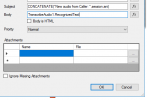
I have it set as below currently, whereby the audio transcription will be contained. Just trying to think how I can get more information in the email.

1709217095071.png
 
Thanks!! It's working well.

Can I put more information/variables in the body of the email? I've already validated the caller with an ID number, matched from a database. I wondered if I could get the ID in the body too as it's already in the project as a variable.

I have it set as below currently, whereby the audio transcription will be contained. Just trying to think how I can get more information in the email.

View attachment 40016
Just use CONCATENATE with as many parameters as you want to build the email body. You can build it as text with \n for new lines, or build as HTML and enable the checkbox "Body is HTML".
 
Thanks, i'm struggling with the new line part, i have below set;

CONCATENATE(TranscribeAudio1.RecognizedText,Validate_ID.CustomerID)

But it's putting the ID right after the transcription, where does the \n come in?
 
CONCATENATE(TranscribeAudio1.RecognizedText,"\n",Validate_ID.CustomerID)
 
Perfect! Thanks again
 
What would be the best way to get the callers email address included?

Using a really simple database, the caller validates with ID 1111, how can I match that against an email address? They've already validated with their ID so I know it doesn't need another validation, just not sure where to go from here.

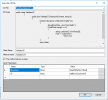
I'm using the validation process below, again really simple, just trying to get each stage working before I move on to the next challenge!

1709226276374.png
 
Status
Not open for further replies.

Members Online Now

No members online now.

Forum statistics

Threads
111,843
Messages
589,327
Members
164,679
Latest member
SamadMYK