CFD - Speech to text help!

Status
Not open for further replies.

robmango

Bronze Partner
Advanced Certified
Joined
May 9, 2023
Messages
20
Reaction score
4
I've got a scenario that I would really appreciate some help with. I've setup Google cloud speech services to integrate with 3CX Call Flow Designer. It's on my 3CX already and working well.

I've hit an issue with two of my options as they both contain the same word/dictionary match. The system i'm deploying for has a multi site setup and they want to prompt inbound callers to state the name of the branch they wish to connect to.

They have two branches in Nottingham. One is simply 'Nottingham' and the other is 'Nottingham Standard Court'

Whenever I state 'Nottingham Standard Court' it just routes to 'Nottingham' every time. Is there a way around this?

For now, i've had to change it to 'Standard Court' so that the system can differentiate between the two dictionary entries.
 
Hello @robmango,

The problem is that the Voice Input component will evaluate the dictionary entries with every recognition returned by Google. So, if the user says "Nottingham Standard Court", then Google will return first just "Nottingham", then "Nottingham Standard", and finally "Nottingham Standard Court". There might be also other partial recognitions in the middle for half words.... Google will not wait for the full phrase, it returns text as it recognizes it. And 3CX tries to match the entries from the dictionary against the recognized text.

As a consequence, even if you specify the order of the dictionary entries with "Nottingham Standard Court" on top, it will probably not be matched. Or maybe it works in some cases but not in others....

The best you can do in this case is leaving the Dictionary empty. In this case, 3CX will not try to match the recognized text against anything, it will just let Google return the recognized text, and wait for the timeout to stop the recognition. The user would have to remain in silence for the timeout you specify, so the recognition ends, and then you can manually analyze the recognized text using a C# script. In this case, you can check if the recognized text has the "Standard Court" text or not first, and then evaluate "Nottingham". The difference against using the Dictionary, is that with the Dictionary the recognition can end faster, and without it the user will need to wait a bit longer....
 
Thanks, appreciate the response. Not sure how I would set things up so that I could manually analyse the recognised text using a C# script...

Is there a guide published anywhere?
 
There are no guides, but a basic C# snippet should work, something like:
C#:
var recognizedTextLowerCase = recognizedText.ToLower();
if (recognizedTextLowerCase.Contains("standard court"))
    return "100"; // For example, return the extension to which you need to transfer in this case
else if (recognizedTextLowerCase.Contains("nottingham"))
    return "101";
else
    return "102"; // Default when no match
 
  • Like
Reactions: TheodorosG_3CX
Thanks, I must be doing something wrong, I can build the project but it won't upload successfully to the 3CX.

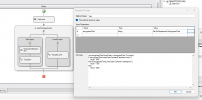
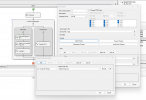
I've added an 'Execute C# Code' tool into the invalid input (as below)

1698076034814.png
 
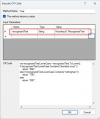
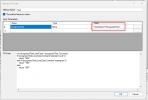
First, you need to pass the recognizedText variable as a parameter, otherwise it will be unknown:
1698077623063.png

Second, this Execute C# Code component must be inside the "Valid Input" branch, because that's where you have a valid speech recognition.

Finally, after this Execute C# Code component you should transfer the call to the value returned by the C# script....
 
  • Like
Reactions: Evolute IT
Thanks,

I've setup as below;
1698134123863.png
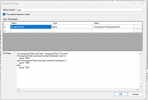
C# code as below

1698134161575.png

The standard court and Nottingham branches have conditions set as;

EQUAL(AskForDepartment.RecognizedText,"standard court")

EQUAL(AskForDepartment.RecognizedText,"Nottingham")

With the transfer destinations set as 666 & 700 respectively.

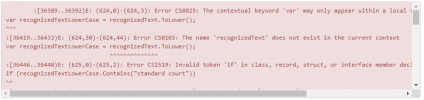
I get errors when loading into my 3CX;

1698134611711.png
 
This is wrong:
1698143620726.png

That's a string, you need the variable containing the recognized text there. In your case, that should be AskForDepartment.RecognizedText (without quotes). You should use the Expression Editor to build expressions without errors.

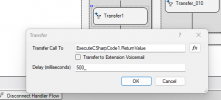
Next, you don't need the Conditional and all the branches after the script. The C# script will return the extension to which you need to transfer, so you just need a single Transfer component, where the Destination is set to ExecuteCSharpCode1.ReturnValue.
 
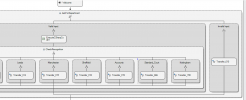
Ok, i've stripped it back to below;

1698149625470.png
1698149654931.png

But i'm still getting the same errors when uploaded to my 3CX...
 
Can you send me a ZIP file with your CFD project sources, so I take a look? Please do not attach it here, as it might have your Google Credentials for STT.
 
Some issues:
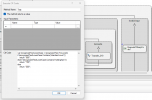
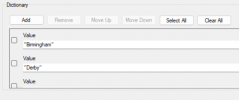
1) The Dictionary still has values:
1698153245751.png

In this case the recognition will fail because the entry will not be matched against the values from this list. You should do all the matchings from the C# script.

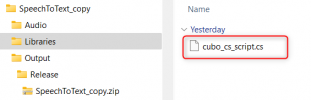
2) The compilation issue is this script that you have in the Libraries folder:
1698153256971.png

That script is included in the build, and causes the issue because it has a wrong format. Please delete that file and the issue will be gone.
 
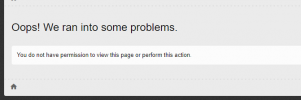
I can't view the attachments, i get the below error...

1698153457077.png
 
Great, that's working now!! Thanks very much, it's now matching from the script. I need to add the other branches to the script and do some more testing but it's looking good so far.

Appreciate the help :)
 
  • Like
Reactions: edossantos
Is there a 'beep' file built in to CFD that i could place after the initial audio prompt?

1698156091151.png
 
Yes, check your 3CX installation, the file "beep.wav" is inside the prompt set folder.
  • Windows: “C:\ProgramData\3CX\Instance1\Data\Ivr\Prompts\Sets\PROMPT_SET_ID”
  • Linux: “/var/lib/3cxpbx/Instance1/Data/Ivr/Prompts/Sets/PROMPT_SET_ID”
 
Great, thanks again :)

The scripting works much better than the dictionary. The system is able to differentiate between the two Nottingham variants.
 
  • Like
Reactions: edossantos
Just got another question on the C# code.

Could I send 'Nottingham' to another CFA component rather than a 3CX extension number? At the moment i've sent it to extension 892 which is another CFA project. 892 is a sub menu for the two Nottingham sites. Wondered if I could keep this contained within the same project, not essential at all as I have this working but would be nice to know.

See below;

var recognizedTextLowerCase = recognizedText.ToLower();
if (recognizedTextLowerCase.Contains("standard court"))
return "017";
else if (recognizedTextLowerCase.Contains("nottingham"))
return "892";
else if (recognizedTextLowerCase.Contains("derby"))
return "012";
else if (recognizedTextLowerCase.Contains("birmingham"))
return "011";
else if (recognizedTextLowerCase.Contains("edinburgh"))
return "013";
else if (recognizedTextLowerCase.Contains("leeds"))
return "014";
else if (recognizedTextLowerCase.Contains("newcastle"))
return "014";
else if (recognizedTextLowerCase.Contains("manchester"))
return "015";
else if (recognizedTextLowerCase.Contains("sheffield"))
return "018";
else if (recognizedTextLowerCase.Contains("accounts"))
return "019";
else
return "010";
 
You can do it, you would need to change the C# script to return something else instead of the extension number, that tells you what was recognized. For example, you could return "nottingham" in that case, and the same for the other options (i.e. "derby" instead of "012", etc.). Then you use a Conditional component to check the returned string, and for Nottingham you offer a menu, and for the other options you transfer the call.
 
Just tried that and it works perfectly, thanks again for all of your help :)
 
  • Like
Reactions: edossantos
Status
Not open for further replies.

Latest Posts

Members Online Now

Forum statistics

Threads
111,844
Messages
589,330
Members
164,680
Latest member
JV J