Change company domain name

john.liu

Premier Customer
Joined
Aug 12, 2021
Messages
18
Reaction score
4
The company I am working for is going to change its name (e.g. from ABC to XYZ) and also its domain name (e.g. from ABC.com to XYZ.com).
What shall I do to reflect the change to our 3CX hosted Pro server in order to replace old name ABC everywhere with new name XYZ, like

1. ABC.3cx.ca:5001 replaced with XYZ.3cx.ca:5001,
2. all users' UPNs and email addresses @abc replaced with @XYZ;
3. old company ABC in any bill replaced with XYZ;
4. and any possible places I have missed.

Thanks a lot for your professional ideas!
 
in v20 you have to perform a fresh install after releasing the fqdn from the key.
 
Thanks Alphabetic for your professional idea!

Would you please provide more details for following questions?
1.Shall I sign up a new account at 3CX with email address at new domain for the new FQDN?
2.Shall I install a brand new server with the new account?
3.How can I release license from old account and assign it to the new one?
4.Can I simply back up the old server and restore it to the new one, and it will still work?

Thanks a lot for your insight!
 
1.Shall I sign up a new account at 3CX with email address at new domain for the new FQDN?
You do not need a new account. The FQDN is assigned directly to the subscription (license).

2.Shall I install a brand new server with the new account?
You will be using the same subscription essentially. You will just need to release it after the instance is stopped.

3.How can I release license from old account and assign it to the new one?
It will be the same account. Once the machine is stopped just redeploy it.

4.Can I simply back up the old server and restore it to the new one, and it will still work?
That will restore your existing FQDN. It will have to be a new install.
 
I really appreciate Nicholas' detailed answers!
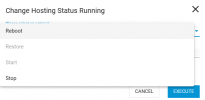
I tried to follow your answer to go to 3CX Customer Portal and found Company Name could be changed but FQDN could not. Shall I stop the instance by "Change Hosting Status Running" to "Stop" and subscription will be released automatically? There are 4 action options to change the status, which action will lead to a new installation after I have stopped the current instance? "Restore" or "Start"? When I reinstall the new instance, will it ask for new FQDN?

Sincere thanks to all of you who have helped and will help!

1740080014411.png
 
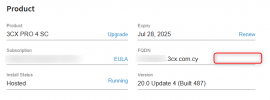
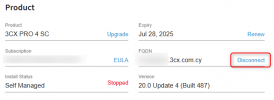
When the machine is stopped, you will then see that there is a disconnect link next to the FQDN. Click on this and it will release the FQDN. When you try to redeploy it will ask you for the new FQDN you wish to use.

Machine running

1740124763537.png

Machine stopped

1740124871553.png
 

Latest Posts

Forum statistics

Threads
111,963
Messages
589,998
Members
164,868
Latest member
swegner