


- Joined
- Jun 16, 2023
- Messages
- 21
- Reaction score
- 1
Hello, I was successfully able to change the external ports used for most of the https applications surround my 3cx env, however I am unable to get the oauth2office2 redirect URI to correctly set.
Current setup Internet -> Firewall (NAT 5432 -> 443) -> 3CX
Changes made: Settings -> Parameters -> Search for FQDN and add port 5432 to the URI
Affected parameters:
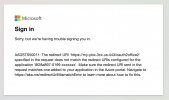
Note that 3CX is sending a return URI using port 443 NOT 5432
Please advise on how to approach this.
Current setup Internet -> Firewall (NAT 5432 -> 443) -> 3CX
Changes made: Settings -> Parameters -> Search for FQDN and add port 5432 to the URI
Affected parameters:
- WEB_ROOT_EXT_SEC
- MYPHONE_LINK_EXT_SEC
- REPORTER_LINK_EXT_SEC
- PROVISIONING_LINK_EXT_SEC
- MANAGEMENT_LINK_EXT_SEC
- CALLUS_LINK_EXT_SEC
AADSTS50011: The redirect URI 'https://my-pbx.3cx.us:443/oauth2office2' specified in the request does not match the redirect URIs configured for the application '8f28a897-0199-xxxxxxx'. Make sure the redirect URI sent in the request matches one added to your application in the Azure portal. Navigate to https://aka.ms/redirectUriMismatchError to learn more about how to fix this.
Note that 3CX is sending a return URI using port 443 NOT 5432
Please advise on how to approach this.


