Changing session expiration timeout in v20

Leo_B

Silver Partner
Basic Certified
Joined
Nov 23, 2020
Messages
104
Reaction score
22
Hello,

Just discovered that 3CX v20 seems to provide the incredibly long timeout for web console session expiration (check the attached image). It looks like the default limit is set to some 60 days, which, to be honest, appears completely unacceptable. How can this value be changed?

Thank you.
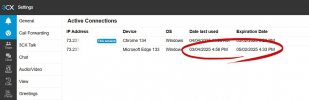
 

Attachments

  • Timeout.jpg
    Timeout.jpg
    53.3 KB · Views: 41
First time ive seen someone moan about that tbh..

surely your computer is locking in 15 minutes of idle? ;)
 
First time ive seen someone moan about that tbh..

surely your computer is locking in 15 minutes of idle? ;)

Indeed it is. Just imagine the following:

– You logged into multiple 3CX consoles on your laptop
– Your laptop was stolen
– The password was successfully cracked
– The attacker easily accessed the mentioned 3CX consoles
– You start moaning in a completely different way
 
  • Like
Reactions: mbrannanATEK
Update 6 doesnt have this view anymore so dont know if anything else has changed.

1744183967559.png

anyway.. now you've identified a woe for you, all you need to do is start opening your 3CX consoles in private browsing.

And it wont be possible for hackers to get in to admin if you locked down your mgmt to IPs.
 
  • Like
Reactions: bitn2

Latest Posts

Forum statistics

Threads
111,964
Messages
590,000
Members
164,869
Latest member
hpgitsupport
