- Joined
- Apr 9, 2020
- Messages
- 5
- Reaction score
- 0
Hello,
We are using an Enterprise 3CX licence.
We would like to change the default values for the video quality in the webmeeting in order to avoid problems caused by internet problems of the students. It is very time consuming to ask each student that joins the meeting to lower the video quality so we would like to change the default value for them, and make it lower, for example 256 Kb/s instead of 1 Mb/s that it is now.
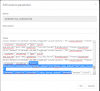
I am trying to change this values in Settings>Parameters>WEBMEETING_PARAMETERS
The problem is that it does not have any effect in the values displayed in Multimedia Settings of the webmeeting created after the change of the parameter.
It is always 1Mb/s.
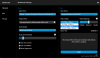
Even ff i try to restart the services, the parameter values are reset to their initial values.
Can you please instruct me what to do to change the default values for the video quality for the organizer and for the participants as well?
Thank you!
We are using an Enterprise 3CX licence.
We would like to change the default values for the video quality in the webmeeting in order to avoid problems caused by internet problems of the students. It is very time consuming to ask each student that joins the meeting to lower the video quality so we would like to change the default value for them, and make it lower, for example 256 Kb/s instead of 1 Mb/s that it is now.
I am trying to change this values in Settings>Parameters>WEBMEETING_PARAMETERS
The problem is that it does not have any effect in the values displayed in Multimedia Settings of the webmeeting created after the change of the parameter.
It is always 1Mb/s.
Even ff i try to restart the services, the parameter values are reset to their initial values.
Can you please instruct me what to do to change the default values for the video quality for the organizer and for the participants as well?
Thank you!