Chrome extension not listing Queues

Status
Not open for further replies.

GBC_James

Premier Customer
Advanced Certified
Joined
Feb 3, 2017
Messages
132
Reaction score
24
Hello all,
When we were using v15.5 , the google chrome extension would list our call queue numbers. This was handy for our customer service team, and when in a call, they could click "Transfer", type in "queue" in the search box and all our queues would be listed and they could put a caller into the relevant queue. 9don't ask about why, and best practice etc. I've gone round and round over the years about why a live caller shouldn't be transfered in to a queue!)

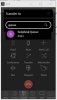
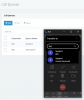
Anyway, since we updated to v16.0.5, queue numbers are no longer being listed in the pop up phone. However, they are listed in the web client itself. (see the attached pics)

It's weird though, because customer service team cant see any, but I can see one, the helpdesk queue, which I am an agent of and manage obviously.

Is this an intentional change, or there a new "show/hide" setting somewhere? Or is there something wrong?

Hope you can help.

thanks
James

 

Attachments

  • queues1.JPG
    queues1.JPG
    120 KB · Views: 11
  • queues2.JPG
    queues2.JPG
    31 KB · Views: 11
  • Like
Reactions: imischa
Hello @GBC_James ,

Indeed there is an identified issue in the latest release that we are working towards fixing it.

We will do our best to have release up online soon with the fix.

Thank you for your feedback.
 
  • Like
Reactions: imischa
Hello @GBC_James ,

Indeed there is an identified issue in the latest release that we are working towards fixing it.

We will do our best to have release up online soon with the fix.

Thank you for your feedback.
Hi. thanks for your reply. I will let them know a fix is being worked on.
 
@Constantinos Constantinou for us it does not solve the problem. I've updated to the latest version of the chrome extension (4.3.0.319) and ringing groups and queues are still not provided in the search for transferring a call.
 
Hello @orgavision,
Can you please provide more information as a personal message? What version of the PBX you are in. Send me screenshots of your scenario that you are trying to do.
 
Hi @Constantinos Constantinou, unfortunately I'm not able to start a private conversation. No matter what I try, I'm always rejected because my message "looks like Spam". So I need to try to explain it in words again here…

We have a 3CX pro 16.0.5.619 hosted by a titanium partner.

I am using Chrome extension in version 4.3.0.319.

We have a bunch of ring groups and one queue.

When I'm in a call and want to transfer the caller to a ring group, I click the transfer button in the extension's popup-phone-window and the search input opens. I then type the name of a ring group or a queue and no result is shown. If I enter the name or extension number of a "normal" extension, the correct result is shown and I can transfer the caller. Same works for address book / CRM contacts.

I hope this helps. If you need the screenshots or screen video I've created we need to find a way to transfer this.

Kind regards

Sven
 
Same PBX version as yours and Chrome Extension latest build.
'
In my case you can see that I search for queues on transfer and I got results.

1596447666557.png
 
Can you please try by creating a new queue and then search for it?
 
Tried it, but it doesn't make a difference.
 
Try the same scenario by installing the Edge Extension on Edge Chromium browser and let me know with the outcome.
 
Unfortunately I have the same experience in Edge Chromium (84.0.522.52) with the latest official 3CX plugin (4.3.0.319). I've created a new queue but it does not show up.
 
Hello Everyone,
Yes the problem still persists with us.
We are on v16.0.5.619 running on Windows Server 2019 Standard.
I've re-installed the extension in both Chrome and Edge and when in a call, if I transfer and search for "Queue" I get just 2 out of our 19 queues appear in the results.
If I search for "800" (all our queues are 80** numbers) then they are all listed in the results, so the chrome extension can see they exist.
It's just searching the word "Queue" doesn't seem to find results.
But like I said originally, in the browser window, using the search bar at the top of the window, searching for "queue" there lists everything just fine.
 
Hello @GBC_James

Can you please try to find for matching queues with the exact letter casing that are created on system ?
 
Prior the listing was not working at all. Now the problem has to do with the casing of those queues/ring groups.

We are working towards fixing the issue and we will keep you posted.

Thank you.
 
Prior the listing was not working at all. Now the problem has to do with the casing of those queues/ring groups.

We are working towards fixing the issue and we will keep you posted.

Thank you.
Thanks very much. At least we have a way forward. It's no hardship for our customer Service team to type an upper case Q :)
 
@Constantinos Constantinou I can also confirm, that I can find groups and queues when using original casing. As a temporary workaround we've created address book entries for each group and these are shown correctly independent of the query's casing.

In contrast to @GBC_James I cannot find queues and groups by extension number, but the same is true for a lot of extensions besides groups and queues. I guess that is due to the fact, that we only have two digit extensions and so there are too many other matches. As a further improvement I suggest that exact matches should appear at the top. So when I type 40 and I have a group with the extension 40, then it should be shown above a CRM contact with the phone number "+49 1234 0152".
 
Status
Not open for further replies.

Forum statistics

Threads
112,349
Messages
592,026
Members
165,512
Latest member
gmacinit