Cisco Meraki MX84

Status
Not open for further replies.

Naz_TeqdUp

SMB User
Joined
Feb 19, 2021
Messages
9
Reaction score
0
Hi All

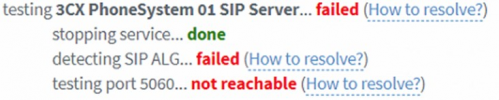
I haven't seen any definitive guide to setting up Cisco Meraki FW Rules for 3CX. I have read a number of forums and looked at the "How to Resolve" link however I am no security expert and have asked for the rules on the Meraki MX84 to be setup by our provider. When running the FW check everything else says "done" apart from the 3 lines below:

1645829770565.png
I have checked the rules, we use a 1:1 NAT and the following is in place:
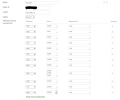
1645829860718.png

As per Cisco Meraki, "ALG is a technology that allows stateful firewalls to dynamically assign ports and broker communication through a NAT. The MX security appliance is a full-featured stateful firewall that does not have any ALG functionality."

I have read or seen videos on using a VLAN however we don't want to do that as our users will be using the desktop/Web app.

Outside of this, is there something I am missing or need to change on the FW or LAN side?

P.S the Meraki was not my choice but my client who leases it from the MSP. :)

TIA
 
Kinda odd because Meraki don't have ALG.

What's their provider? My guess is the modem has it or isn't configured in bridge.
 
Kinda odd because Meraki don't have ALG.

What's their provider? My guess is the modem has it or isn't configured in bridge.
The Meraki is a Router/firewall and configured onto the ISP network over fibre. No modem or Bridge mode, I think it may be using PPPOE.

I can't figure out what is, for testing purposes they have set inbound rules to allow all and still the same appears
 
Make changes to your firewall rules , you do not have to configure Nat rules for outbound traffic I.e IOS push ports , google push ports

https://www.3cx.com/docs/manual/firewall-router-configuration/

What are you dns servers on the 3cx server , as a test change them to google 8.8.8.8 and 8.8.4.4

Maybe a call to the isp, to see if the Cisco has sip alg and how to disable it
 
Last edited:
Make changes to your firewall rules , you do not have to configure Nat rules for outbound traffic I.e IOS push ports , google push ports

https://www.3cx.com/docs/manual/firewall-router-configuration/

What are you dns servers on the 3cx server , as a test change them to google 8.8.8.8 and 8.8.4.4

Maybe a call to the isp, to see if the Cisco has sip alg and how to disable it
I've already done this, all outbound traffic is allowed so no rules are blocking it and at this stage to test, we've allowed all inbound traffic too. I posted the cisco comments on ALG in my question.

Maybe, I need to ask if there's a way we can test using telnet from my LAN, anyone know what URL or IP I can try doing a telnet to on port 5060? Will Telnet or ping work to check that it's getting to the servers it needs to?


Attachments

Meraki (from before Cisco bought them) veteran here.

As you mentioned, there is no ALG on an MX. And your rules look correct, so few options
1) The MX is behind some sort of NAT (Double NAT from modem, etc, CGNAT, etc)
2) Firewall checker is not accurate.
3) Something on the ISP side is just blocking port 5060

It's likely to be #3 here.

For 1, it's simple to diagnose.
Security & SD WAN -> Appliance Status -> Uplink tab
Note the "public IP" under General and then note the "IP Address" under WAN.
Are they the same? If not, the MX is being NAT'd somehow. Only exception is if doing Warm Spare with VIP.

For #2, yes it's possible. I personally had a PBX that would fail firewall checker. I grabbed a wireshark and saw that everything was working as expected. I posted about it and a 3CX employee even checked my work. Everything worked as expected. The conclusion - reinstall the PBX. Took 15 minutes and problem solved - nothing else changed. So if #1 doesn't pan out, start review packet captures. See this for more information: https://www.3cx.com/docs/firewall-checker/

For #3, you'll have to get the ISP involved. Or reinstall PBX with a SIP port not 5060.
 
  • Like
Reactions: Evolute IT
Also, I'd be curious to know what OS the PBX is running on. Windows or Linux.
 
Just to clarify,

You have only two tests failing:
SIP ALG and SIP Port 5060. The SIP Server test failed as a category due to the two sub tests.


The SIP ALG test and the Port 5060 test use different destination ports:
1646041955018.png

SIP ALG
-------------
The SIP ALG test (red box) will have the PBX send SIP traffic to the SIP ALG test server on UDP port 5060 and from the PBX's SIP Port (this case also 5060)

Port 5060
-------------
The Port 5060 test (blue box) will have the PBX send UDP traffic to one of the 3CX Stun servers to default stun port 3478 from the PBX's SIP Port (This case 5060).

Also, these are the only two tests during the firewall checker that use UDP port 5060 as a source port so you might want to check if you perhaps have any outbound restrictions based on source port or anything similar.

Also, a side note, I noticed you have an inbound rule for port 2528 but it in isn't needed as port 2528 is the SMTP's port, meaning it's outbound traffic for the PBX.
 
Status
Not open for further replies.

Forum statistics

Threads
111,974
Messages
590,083
Members
164,901
Latest member
Silent_Guru