Cisco SPA 504G phone is not making calls

Status
Not open for further replies.
Instead of providing the IP address in the Proxy field, try providing the FQDN of your 3Cx.
You will get it from Settings > Network > FQDN
 
Instead of providing the IP address in the Proxy field, try providing the FQDN of your 3Cx.
You will get it from Settings > Network > FQDN
If I do that it goes on checking DNS forever again
 
I believe you may have network issues that prevent the phone from provisioning or registering.
Try to provision a 3CX client and see if that registers ok. Download the latest 3CX client
https://www.3cx.com/phone-system/download-links/ and send a welcome email from an extension. Download and double click on the welcome email to provision the client and see if that provisions correctly.
 
I believe you may have network issues that prevent the phone from provisioning or registering.
Try to provision a 3CX client and see if that registers ok. Download the latest 3CX client
https://www.3cx.com/phone-system/download-links/ and send a welcome email from an extension. Download and double click on the welcome email to provision the client and see if that provisions correctly.
Yes that was my first step. And that works fine.
 
Do you have a different support device that supports PnP provisioning so you can test that ? If so does that device provision?
 
Do you have a different support device that supports PnP provisioning so you can test that ? If so does that device provision?
It does not.
 
Hello ANaeem,

Not sure if you are still having this issue but my customers are using Cisco SPA 504 handsets as well. The Cisco handsets that my customers are using are remote instead of local though.

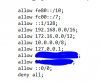
To get them to provision/register i have to add their WAN IP address to the nginx config file which is located /var/lib/3cxpbx/bin/nginx/conf/nginx.conf for linux installs. In the screenshot below i added the WAN IP address of the customer and saved it.
upload_2018-7-27_14-22-27.png
You shouldn't have to do this for local provisioning but what can it hurt to try if you are still having issues.

I then follow the normal provisioning steps by putting the provisioning link into the profile rule field, apply config, wait for the phone to come back up and then the "(ipaddress)/admin/resync" command in the web gui. This will make the phone sync to the server and register.

Hope this helps.

Kind Regards
Micahel
 
Status
Not open for further replies.

Latest Posts

Forum statistics

Threads
111,889
Messages
589,573
Members
164,753
Latest member
GemmaC