Solved Codec configuration error

Status
Not open for further replies.

shofman

Bronze Partner
Advanced Certified
Joined
Feb 21, 2019
Messages
4
Reaction score
0
Hi,
I have a sound quality problem with hosted by 3CX.
I think there's a problem with codec order :

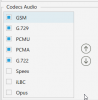
Default server configuration :
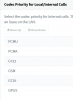
2020-10-13 09_05_50-3CX Phone System Management Console.png

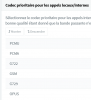
Default client configuration :

2020-10-13 09_07_07-3CX - 150 Stephane HOFMAN.png

The server order is not the same as local hosted 3cx...
So Is it normal ?
If I make a change in the server, how can I send the update to the client ?
reprovisionning or resend welcome email does not change that...
 
Hi, do you have the issue even when you make internal calls or only with external ?
So if you call from an extension to another extension, do you have the issue ?
 
Hi, do you have the issue even when you make internal calls or only with external ?
So if you call from an extension to another extension, do you have the issue ?

The problem is only with internal call.
The SIP Trunk configuration is Ok (codec order in the same page is not used)
 
@shofman can you create 2 extensions in an isolated group of extensions and PM me the QR Codes to run some tests from my side also ?
Also, does this happen with mobiles, with 3cx phone for Windows, with 3cx Web Clients ?
 
You have the QR Code.
The problem is with Windows Client.
Now the codec in the server are the same as client...
 
@shofman as per our private chat can you send me the welcome emails ?
Because the QR Code screenshots you sent me, don't work.
 
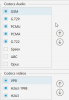
Default configuration for a new server :

2020-10-13 14_41_06-3CX Phone System Management Console.png

Default configuration for a client :
2020-10-13 14_44_34-3CX - 150 Stephane HOFMAN.png

As you can see, it's not the same...
So there's something wrong for me : the default client configuration should be the same as the server configuration.
 
As explained in the private conversation we had :


the screenshot you opened the Thread is from the Management Console>> Settings >> General >> Codec Priority for Local/Internal Calls
Now this will apply in general.
If you want to be specific you can go to the Management Console, edit your extension and in the Phone Provisioning tab you will see that for the 3cx Application the codecs are correct.
If you add a deskphone you will see that the codecs will be the ones from the General Settings of the PBX.

Also this applies to the Calls that are initiated from the PBX side to internal extensions ( like CallBack from Queues, Conference ) and depending what are the codecs on the endpoint and the priority, the correct codec is selected.
With that in mind, you may adjust your codecs as you want but since we could not replicate your issue on our side with the 2 Test provided extensions, I would recommend to ensure that your headsets do not have any issues.


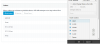
1602594115537.png
 
Status
Not open for further replies.

Forum statistics

Threads
112,326
Messages
591,901
Members
165,479
Latest member
Senergia