- Joined
- Oct 13, 2020
- Messages
- 1
- Reaction score
- 0
It appears that the new desktop app is not allowing the use of multiple accounts.
I have an extension setup for my own 3cx system as well as an extension for myself on each of my clients 3cx systems. I need my own extension on there systems for making test calls, testing caller ID configurations, playback of recordings and menu's, and so on...
In order to provide the same level of customer service to my clients that use 3CX, I now have to login to a password manager, navigate to the clients web portal, find and enter credentials, and then re-provision my desktop app to connect to their 3CX system, after I am finished supporting them I then have to follow all the same steps to reprovision the app to work with my 3CX system, and then repeat.
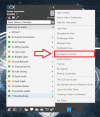
As compared to selecting "3 dots", select "Configure accounts", select the account I want, then done. I have attached a screenshot of the prior application.
I have an extension setup for my own 3cx system as well as an extension for myself on each of my clients 3cx systems. I need my own extension on there systems for making test calls, testing caller ID configurations, playback of recordings and menu's, and so on...
In order to provide the same level of customer service to my clients that use 3CX, I now have to login to a password manager, navigate to the clients web portal, find and enter credentials, and then re-provision my desktop app to connect to their 3CX system, after I am finished supporting them I then have to follow all the same steps to reprovision the app to work with my 3CX system, and then repeat.
As compared to selecting "3 dots", select "Configure accounts", select the account I want, then done. I have attached a screenshot of the prior application.