Solved Configure Outbound Rules

Status
Not open for further replies.

pc2024

Free User
Joined
Mar 4, 2024
Messages
2
Reaction score
0
Hi, I have set up two SIP trunks. How would I configure the Outbound Rules so all calls dialled as 0044 and +44 goes through trunk 1 and all other calls goes through trunk 2? Do I need to tick the box Process E164 Numbers? I am running 18.0 (Build 20) self hosted.
 
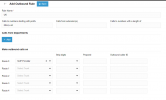
You would create an outbound rule for the prefixes of 0044,+44 and select the trunk you need.

1709559501908.png

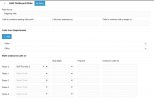
Then create another rule for your extensions and groups to go through the 2nd trunk.

1709559572964.png

The screenshot provided are in Version 20, but they are essentially the same logic
 
Status
Not open for further replies.

Members Online Now

No members online now.

Forum statistics

Threads
111,831
Messages
589,277
Members
164,660
Latest member
RJenkinsROCK