Configuring/adding 2nd SIP Trunks

Status
Not open for further replies.

NaveenReddy

Customer
Joined
Feb 1, 2022
Messages
12
Reaction score
0
Present Setup:
--3CX Server version 18.0 update 2 Build 307(Professional Annual with 16 Channels) Instaled in Windows server
--All extensions are in "Default" groups
--DID is from provider siptrunk.com
--SIP Trunk added and incoming calls will land to Digital Receptionists named "IVR 801 Main"
--Digital Receptionists "IVR 801 Main" open IVR with options 1-Call by name 2. Connect to a digital receptionist named "IVR 802 Hours and Fax" 3. Connect to Queue named "805 Main" (Rest of the keys configured to "Nothing")

"digital receptionist-IVR 802 Hours and Fax"
It is configured to play office address, hours, and fax number audio file
Key 0- connects to Digital Receptionists "IVR 801 Main"
Key 9- Repeat Prompt
Rest of the keys "Nothing"
If no input within seconds: 60 -- End Call
If input is invalid then: connect to IVR -- "IVR 801 Main"

Call Queues named "805 Main"
Polling Strategy: Ring All
Ring Time (Seconds): 30
Destination if no answer-- Maximum Queue Wait Time (seconds):600 Voicemail box for Extension: "extension number 112"
Announce Queue position to caller: Announcement Interval (seconds):30
Queue Language: Standard English Prompts Set
Agents Tab: Call Queue Agents: some extensions added

--No Inbound Rules configured
Outbound Rules
1. Local 10 digit: Calls to Numbers with a length of "10" Make outbound calls on Route 1 to 5 : gw1.siptrunk.com, Strip Digits is "0" and prepend is "1"
2. Local Calls: Calls to Numbers with a length of "7" Make outbound calls on Route 1 to 5 : gw1.siptrunk.com, Strip Digits is "0" and prepend is "1480"
3. Long Distance 800: Calls to Numbers with a length of "11" Make outbound calls on Route 1 to 5 : gw1.siptrunk.com Strip Digits is "0"

Requirement:
We need to add one more SIP Trunk DID from the same provider(siptrunk.com) or another provider(CallCentric)
Some user extensions will be added to group1 and some to group2
calls from 2nd SIP Trunk must land to group2
extensions present in group2 should be able to make outgoing calls from the 2nd SIP Trunk and extensions present in the group1 should be able to make outgoing calls from 1st SIP Trunk(present)
Please suggest as we are new to 3CX
 
Present Setup:
--3CX Server version 18.0 update 2 Build 307(Professional Annual with 16 Channels) Instaled in Windows server
--All extensions are in "Default" groups
--DID is from provider siptrunk.com
--SIP Trunk added and incoming calls will land to Digital Receptionists named "IVR 801 Main"
--Digital Receptionists "IVR 801 Main" open IVR with options 1-Call by name 2. Connect to a digital receptionist named "IVR 802 Hours and Fax" 3. Connect to Queue named "805 Main" (Rest of the keys configured to "Nothing")

"digital receptionist-IVR 802 Hours and Fax"
It is configured to play office address, hours, and fax number audio file
Key 0- connects to Digital Receptionists "IVR 801 Main"
Key 9- Repeat Prompt
Rest of the keys "Nothing"
If no input within seconds: 60 -- End Call
If input is invalid then: connect to IVR -- "IVR 801 Main"

Call Queues named "805 Main"
Polling Strategy: Ring All
Ring Time (Seconds): 30
Destination if no answer-- Maximum Queue Wait Time (seconds):600 Voicemail box for Extension: "extension number 112"
Announce Queue position to caller: Announcement Interval (seconds):30
Queue Language: Standard English Prompts Set
Agents Tab: Call Queue Agents: some extensions added

--No Inbound Rules configured
Outbound Rules
1. Local 10 digit: Calls to Numbers with a length of "10" Make outbound calls on Route 1 to 5 : gw1.siptrunk.com, Strip Digits is "0" and prepend is "1"
2. Local Calls: Calls to Numbers with a length of "7" Make outbound calls on Route 1 to 5 : gw1.siptrunk.com, Strip Digits is "0" and prepend is "1480"
3. Long Distance 800: Calls to Numbers with a length of "11" Make outbound calls on Route 1 to 5 : gw1.siptrunk.com Strip Digits is "0"

Requirement:
We need to add one more SIP Trunk DID from the same provider(siptrunk.com) or another provider(CallCentric)
Some user extensions will be added to group1 and some to group2
calls from 2nd SIP Trunk must land to group2
extensions present in group2 should be able to make outgoing calls from the 2nd SIP Trunk and extensions present in the group1 should be able to make outgoing calls from 1st SIP Trunk(present)
Please suggest as we are new to 3CX
Inbound is easy: use different IVRs and rules to direct the DID.

Outbound is also easy: create rules filtering out on user groups and set the Outbound Caller ID in the rule to override it. This way, users from group 2 would show the DID 2.

It's easier to have them in one trunk but having multiple trunk is certainly doable.
 
  • Like
Reactions: YiannisH_3CX
You can achieve what you need by adding more DIDs in the same trunk. Split your users into your groups and use inbound rules to either direct calls to another IVR or directly to users in group 2.
For outbound just create a second outbound rule and filter by group. You can also set your caller ID in the outbound rules are well.
One thing to remember is that outbound rules are evaluated from the top down so you will need to see in which order to place them.
 
  • Like
Reactions: Evolute IT
You can achieve what you need by adding more DIDs in the same trunk. Split your users into your groups and use inbound rules to either direct calls to another IVR or directly to users in group 2.
For outbound just create a second outbound rule and filter by group. You can also set your caller ID in the outbound rules are well.
One thing to remember is that outbound rules are evaluated from the top down so you will need to see in which order to place them.
Hello Yiannish, Thank you for the response. What I thought was,
--I will create 2 groups and split/add extensions to both groups as per the requirement(Group1 and Group2).
--Create a new Call Queues extension(806) and add extensions present in group2 in the agents tab
--Create new Digital Receptionist(807) for office hours and fax number
--Create new Digital Receptionist(808) for the Main IVR(CallCentric), with key 1: Call by name Key 2: connect to digital receptionist(807 for office hours,Fax and address) key 3: connect to Queue(806)
--get a DID number from a different provider(CallCentric).
--Add SIPTrunk: Route calls to 808
--not creating any inbound rules
--Create new Outbound rules same as the existing setup
Questions
1. do I need to edit the existing outbound rules and add "Group1" at "Calls from extension group(s)" so that when extensions present in group1 make outgoing calls they will go through gw1.siptrunk.com DID?
2. While adding the same Outbound rules-- should I add "Group2" at "Calls from extension group(s)" so that when extensions present in group2 make calls they will go through CallCentric DID?
3. What happens when an incoming call user presses key:1 " Call by name" does it include both group1 and group2 users?
4. Is anything else I need to configure to make this work?
 
Questions
1. do I need to edit the existing outbound rules and add "Group1" at "Calls from extension group(s)" so that when extensions present in group1 make outgoing calls they will go through gw1.siptrunk.com DID?
You can do that if you want users from Group 1 to be able to use that trunk.
2. While adding the same Outbound rules-- should I add "Group2" at "Calls from extension group(s)" so that when extensions present in group2 make calls they will go through CallCentric DID?
Same as before. If users from Group 2 need to only use that trunk then yes.
3. What happens when an incoming call user presses key:1 " Call by name" does it include both group1 and group2 users?
Yes it does. The call by name feature is system wide.

4. Is anything else I need to configure to make this work?
Make sure that the users you add to group 2 are removed from the other other groups so that the outbound rules are applied correctly. So users should only be members of one group. Other than that your configuration is pretty straight forward.
 
You can achieve what you need by adding more DIDs in the same trunk. Split your users into your groups and use inbound rules to either direct calls to another IVR or directly to users in group 2.
For outbound just create a second outbound rule and filter by group. You can also set your caller ID in the outbound rules are well.
One thing to remember is that outbound rules are evaluated from the top down so you will need to see in which order to place them.
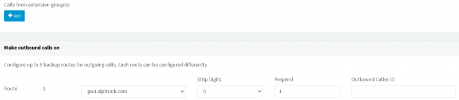
Hello Yiannish, Could you please clarify on the outbound. When you said " create a second outbould rule and filter by group" you mean to say i should add group2 at "Calls from extension group(s)" in the new outbound rule?. when you said " You can also set your caller ID in the Outbound rules" you mean to say i should add DID number at "Outbound Caller ID" in the new outbound rule?outbound rule.PNG
 
When you said " create a second outbound rule and filter by group" you mean to say i should add group2 at "Calls from extension group(s)" in the new outbound rule?
Yes, exactly
You can also set your caller ID in the Outbound rules" you mean to say i should add DID number at "Outbound Caller ID" in the new outbound rule?
Yes. If you have multiple numbers from the same provider you can use the outbound caller ID filed of the outbound rules to set a caller ID so the people you contact from that number will be able to call you back to the same number.
You can of course also set a caller ID in the extension and trunk level depending on your requirements.
 
Yes, exactly

Yes. If you have multiple numbers from the same provider you can use the outbound caller ID filed of the outbound rules to set a caller ID so the people you contact from that number will be able to call you back to the same number.
You can of course also set a caller ID in the extension and trunk level depending on your requirements.
Thank you Yiannish. When we specify "Outbound caller ID" the calls will go from that specific DID only?
 
The trunk used will be the one set in the Route 1 option. The caller ID sent will be the one set in the "Outbound caller ID" if your provider supports the functionality. So the people you call will see that the specific number is calling them
 
Status
Not open for further replies.

Forum statistics

Threads
112,326
Messages
591,901
Members
165,479
Latest member
Senergia