Critical NGINX Security Update - Update Your 3CX Now

MichaelB_3CX

3CX Team
Staff member
3CX Support
Joined
Aug 25, 2009
Messages
572
Reaction score
770

Applies to: Self-managed 3CX on Linux and Windows (on-premise or in your own cloud), including Multi Company systems you or your partner run. Hosted by 3CX and 3CX SMB systems are updated by 3CX.​

Two critical security flaws were made public in NGINX on 18 November. NGINX is the web server built into every 3CX that serves the We...
Continue reading the Original Blog Post.
 
Last edited by a moderator:
Working ! Thx !
 
thank you! :)
Will the security patch also be available for 20U9 ?
 
  • Like
Reactions: N_G
thank you! :)
Will the security patch also be available for 20U9 ?


It's not a security patch, it's an update. You'll need to upgrade to U10, which includes the fix.

1795171882473.png
 
Does any of the recent updates issue a reboot? I've not seen any of our 3cx systems reboot after the kernel upgrade. Afaik these systems are still at risk until rebooted?
 
When running on debian using the 3CX ISO, does running apt update && apt upgrade && reboot does the trick ?
Because our weekly 3CX auto-update will not run until mid next-week, but we can start the previous commands using ansible on our 3CX fleets.
 
When running on debian using the 3CX ISO, does running apt update && apt upgrade && reboot does the trick ?
Because our weekly 3CX auto-update will not run until mid next-week, but we can start the previous commands using ansible on our 3CX fleets.
Yes it will. I did apt upgrade on ours this morning.
 
  • Like
Reactions: N_G and mls.nicolas
Does any of the recent updates issue a reboot? I've not seen any of our 3cx systems reboot after the kernel upgrade. Afaik these systems are still at risk until rebooted?
This is a PBX update. Manually upgrading to this version will not trigger unattended upgrades to install the latest Debian packages.

However, we did recently release new Debian security updates
https://www.3cx.com/blog/change-log/pbx-security-updates, including the latest kernel updates.

These security updates can be installed in two ways:
- Automatically: If automatic updates are enabled, they will be installed at the scheduled update time.
- Manually: Starting with SP10, these updates are also available in the Admin Console under Updates → OS Security Updates.

In both cases, once the security updates are installed, the system will automatically reboot if required, for example, when kernel updates are applied.
If you don't see any updates available, you can generally assume that your system is already up to date.
However, kernel updates do require a reboot to take effect yes.
If you're certain that no reboot has occurred, you can connect to your machine via SSH and run the following command to ensure you are running the latest kernel:
uname -r`

Currently you should see version 6.1.0-56-amd64
if not, we should further investigate this
 
Does this affect installations running V20 SP8A?
 
Does this affect installations running V20 U8A?
Yes, many prior NGINX versions are affected. u8 is also two versions behind now.

any of the recent updates issue a reboot

FWIW, I checked one where I installed the latest fix as well as the Debian updates this morning, both manually. It did restart and is running the new kernel.
 
I seem to be having an issue updating our servers. I´ve manually launched the update and left it to do its business but it doesnt appear to update the version. I first tried it first thing this morning, and now again 4 hrs later and the same, I still see there is an update pending to 1801. I´ve tried rebooting the server and then launching the update again, same issue.

Anyone else experienced a similar issue?

Thanks in advance!
 
I updated all ours this morning with no issue. Took maybe a minute or two. The Dashboard page does need a refresh/F5 to show the new version.

Do you get an email for/with the failed update log?
 
  • Like
Reactions: Evolute IT
I seem to be having an issue updating our servers. I´ve manually launched the update and left it to do its business but it doesnt appear to update the version. I first tried it first thing this morning, and now again 4 hrs later and the same, I still see there is an update pending to 1801. I´ve tried rebooting the server and then launching the update again, same issue.

Anyone else experienced a similar issue?

Thanks in advance!
So as i understand the PBX stays alive after you trigger the update? If yes, potentially it fails on the background leaving current version running. But in this case you should be receiving an email about the update failing with the updater log, assuming you initiate the update from within the Admin Console. Have you receive such email? Also any relevant errors in event log?
These are a few quick checks you can easily perform to help narrow down the issue.
 
  • Like
Reactions: N_G
I updated all ours this morning with no issue. Took maybe a minute or two. The Dashboard page does need a refresh/F5 to show the new version.

Do you get an email for/with the failed update log?
Hi Steve,

Thanks for the advice, checked in the logs and looks like it was an error with dpkg, so ran "sudo dpkg --configure -a" from shell, then ran the update and all working.

Thanks again!
 
  • Like
Reactions: SteveITS
Updated this morning. Thank you for the prompt release!
 
  • Like
Reactions: N_G and mariosM_3CX
If you're certain that no reboot has occurred, you can connect to your machine via SSH and run the following command to ensure you are running the latest kernel:
uname -r`

Currently you should see version 6.1.0-56-amd64
if not, we should further investigate this
Thanks for the clarification. I have at leas one system that has reported update installation yesterday but is still on 6.1.0-52-amd64 without a reboot. Uptime is 18 days.
 
And it is on v20u10 with today's 1801 build? And the Debian OS Security Updates installed? That's unexpected.
 
  • Like
Reactions: N_G
Hello,
during the night one OVH hosted pbx has been succesfully updated (i received a confirmation email) , but this morning i'm no more able to log in as admin.
The pbx seems running but i can't access to the console anymore.
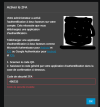
I get invalid password , but they are the good one (used from lastpass) so i did the forgot password process and changed the password with success but after I have been asked to scan the 2FA QR i get each time : invalid security code.
1795253052708.png
So now what can i need to do to regain console access. Actually i've no access to the OVH instance. Is there still a way or am i stuck until i get an OVH acess?

Thanks for help.
 

Forum statistics

Threads
112,560
Messages
593,303
Members
165,773
Latest member
r.dahal