- Joined
- Jan 12, 2021
- Messages
- 34
- Reaction score
- 8
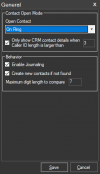
We are using the Windows client and I am see in Settings that there is an Integration option to show Contact on Ring:
However in this thread I read that the Windows app will not create contact popups: https://www.3cx.com/community/threads/unable-to-get-crm-popping-up.75743/
If the Windows client is incapable of opening a contact in CRM why is the integration option available as displayed above? We would like the Windows client to create contact screen pops just as the 3CX browser extension does. For technical reasons we cannot use the browser extension for these users.
Is there any way the Windows client can create CRM screen pops when a call comes in?
Thank you!
However in this thread I read that the Windows app will not create contact popups: https://www.3cx.com/community/threads/unable-to-get-crm-popping-up.75743/
If the Windows client is incapable of opening a contact in CRM why is the integration option available as displayed above? We would like the Windows client to create contact screen pops just as the 3CX browser extension does. For technical reasons we cannot use the browser extension for these users.
Is there any way the Windows client can create CRM screen pops when a call comes in?
Thank you!