CRM Contacts still showing even though the Hide option is enabled.

eig-support

Premier Customer
Joined
Jul 2, 2024
Messages
17
Reaction score
3
We are currently running V20 Update 3 and using Windows Softphone V20.0.580.0 and although having the option 'Hide CRM contacts from 3CX Apps company phonebook' disabled (see below), the contacts are still visible on the Windows Softphone, Android and IOS Apps under the All option.
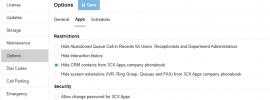
1728886131405.png

Has anyone else come across this issue?
 
You can also simply disable the sync of contacts and then clear them from the phonebook. This way they will never appear.

Note that if you use a supported CRM, they can all do text search so CRM contacts might appear when dialing or searching.
 
'disable the sync of contacts' - do you mean the below option in the Integration Menu? Thanks

1728921010912.png
 
  • Like
Reactions: Evolute IT
Thanks for the information, we will check this route.

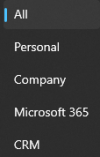
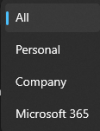
In the meantime though, I find it strange that when 'Hide CRM contacts from 3CX Apps company phonebook' is enabled, the CRM option is only removed, but the CRM contacts are still visible under the All option. My understanding is that if this option is enabled, CRM contacts should never be shown, irrespective of the option selected in the drop down. Any thoughts? Thanks

When not selected:
1728975754709.png

When Selected:
1728975651670.png
 
Looks like a bug. I would open a support ticket to report it, so it can be fixed.
 
Thanks. Appreciated
 

Forum statistics

Threads
111,955
Messages
589,925
Members
164,853
Latest member
as7h