CRM created Contacts are not showing up for the users

Status
Not open for further replies.

zakaria m

Free User
Joined
Mar 23, 2022
Messages
34
Reaction score
9
Hi, hope everyone is doing well ;

We're having a problem with CRM created contacts not showing up for users, only the contacts created in 3CX show up,
and these CRM created contacts are synced with 3CX, I can see them in the management console,
at least the ones that are automatically created, or the ones manually created they won't show up until there's a call, or it takes some time, am not 100% sure on this one.
 
CRM contacts are added to the phonebook only when a call is going to/coming from that number. There is no "sync" per se. It's just an API call to get the contact.

Also, those will appear in Webclient > Contacts > CRM. They will not show up under All.
 
Thanks for the clarification, I didn't realize that, good to know

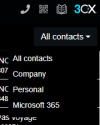
In the Webclient I only found all contacts, company, personal and Microsoft 365, no CRM? And where do I find it in the desktop app, or does it only appear on the webclient?


WC contact.PNG
 
Last edited:
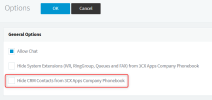
Check that the option "3CX Console > Settings > Options > Hide CRM Contacts from 3CX Apps Company Phonebook" is unchecked.1661958719937.png
 
Yes, that was the problem, is it checked by default? Because I don't remember touching it
 
  • Like
Reactions: edossantos
Yes, that was the problem, is it checked by default? Because I don't remember touching it
Not sure which is the default value to be honest....
 
This option is disabled by default. You may also check in the audit log if there was any change for this option.
 
Status
Not open for further replies.

Members Online Now

Forum statistics

Threads
111,843
Messages
589,328
Members
164,679
Latest member
SamadMYK