- Joined
- Mar 5, 2024
- Messages
- 15
- Reaction score
- 3
Having a bit of a bumpy ride with the Salesforce v2 integration. After having having resolved issues with 0auth and Lead object the next obstacle is this.
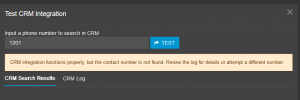
The authentication works and the object view permissions are set correctly (as far as I know), the connectivity test from 3cx side says this:
CRM integration functions properly, but the contact number is not found. Review the log for details or attempt a different number.
Logs are saying:
Started scenario with empty id
Started Auth
Request text: https://login.salesforce.com/services/oauth2/token
Request form value grant_type set to refresh_token
Request form value refresh_token set to XXX
Request form value client_id set to XXX
Request form value client_secret set to XXX
Response text: {"access_token":"XXX","signature":"XXX","scope":"refresh_token web openid api id full","instance_url":"XXX","id":"https://login.salesforce.com/XXX","token_type":"Bearer","issued_at":"XXX"}
Response finished
Variable Url set to https://XXX.my.salesforce.com
Variable AccessToken set to XXX
Finished Auth
Request text: https://XXX.my.salesforce.com/services/data/v55.0/search/?q=FIND {1201} IN PHONE FIELDS RETURNING Contact(Id,FirstName,LastName,Title,Department,AssistantPhone,Fax,HomePhone,MobilePhone,OtherPhone,Phone,Email,AccountId)
Response text: {"searchRecords":[]}
Response finished
Finished scenario with empty id
Started scenario with empty id
Request text: https://XXX.my.salesforce.com/services/data/v55.0/search/?q=FIND {1201} IN PHONE FIELDS RETURNING Lead(Id,FirstName,LastName,Title,Fax,MobilePhone,Phone,Email,Company)
Response text: {"searchRecords":[]}
Response finished
Finished scenario with empty id
Started scenario with empty id
Request text: https://XXX.my.salesforce.com/services/data/v55.0/search/?q=FIND {1201} IN PHONE FIELDS RETURNING Account(Id,Name,Fax,Phone)
Response text: {"searchRecords":[]}
Response finished
Finished scenario with empty id
I know for a fact that the extension 1201 I'm testing for is in the Salesforce user account. I am not getting the user data pulled in however...
The authentication works and the object view permissions are set correctly (as far as I know), the connectivity test from 3cx side says this:
CRM integration functions properly, but the contact number is not found. Review the log for details or attempt a different number.
Logs are saying:
Started scenario with empty id
Started Auth
Request text: https://login.salesforce.com/services/oauth2/token
Request form value grant_type set to refresh_token
Request form value refresh_token set to XXX
Request form value client_id set to XXX
Request form value client_secret set to XXX
Response text: {"access_token":"XXX","signature":"XXX","scope":"refresh_token web openid api id full","instance_url":"XXX","id":"https://login.salesforce.com/XXX","token_type":"Bearer","issued_at":"XXX"}
Response finished
Variable Url set to https://XXX.my.salesforce.com
Variable AccessToken set to XXX
Finished Auth
Request text: https://XXX.my.salesforce.com/services/data/v55.0/search/?q=FIND {1201} IN PHONE FIELDS RETURNING Contact(Id,FirstName,LastName,Title,Department,AssistantPhone,Fax,HomePhone,MobilePhone,OtherPhone,Phone,Email,AccountId)
Response text: {"searchRecords":[]}
Response finished
Finished scenario with empty id
Started scenario with empty id
Request text: https://XXX.my.salesforce.com/services/data/v55.0/search/?q=FIND {1201} IN PHONE FIELDS RETURNING Lead(Id,FirstName,LastName,Title,Fax,MobilePhone,Phone,Email,Company)
Response text: {"searchRecords":[]}
Response finished
Finished scenario with empty id
Started scenario with empty id
Request text: https://XXX.my.salesforce.com/services/data/v55.0/search/?q=FIND {1201} IN PHONE FIELDS RETURNING Account(Id,Name,Fax,Phone)
Response text: {"searchRecords":[]}
Response finished
Finished scenario with empty id
I know for a fact that the extension 1201 I'm testing for is in the Salesforce user account. I am not getting the user data pulled in however...