


- Joined
- Jul 26, 2021
- Messages
- 6
- Reaction score
- 2
It's been a whole year since we implemented our Teams Directing Routing with 3CX and it's worked flawlessly! Today's the day I came to replace the SSL certificate just before it expired to make sure we didn't have any issues.
It's great to see that the Article (https://www.3cx.com/docs/microsoft-teams-business-voice/) has been updated to give some clearer instructions and the inclusion of the CSR Generator is a welcome addition. I just wanted to point out some quick errors that would help make things a little easier for people:
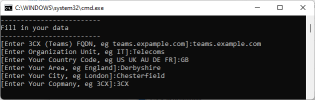
It's great to see that the Article (https://www.3cx.com/docs/microsoft-teams-business-voice/) has been updated to give some clearer instructions and the inclusion of the CSR Generator is a welcome addition. I just wanted to point out some quick errors that would help make things a little easier for people:
- On the first step, I'm pretty sure the example should be teams.example.com rather than teams.expample.com
- For the Country Code, the ISO 3166 Alpha-2 Code for (the) United Kingdom of Great Britain and Northern Ireland is in fact GB, not UK as in the example
- For the Area, this is usually County or State, so shouldn't be England in the example
- Company is spelled incorrectly


