- Joined
- Feb 5, 2019
- Messages
- 7
- Reaction score
- 0
Hello,
I have an android phone where I use the 3cx app. Whenever in the local lan (wifi) it works.
However when I am not in the local lan it does not connect (Waiting for network).
I activated "Use 3CX Tunnel for remote connections (3CX Client only)" on that extension.
I have (ONLY!) the Port 5090 forwarded on the firewall.
I get a lot of "icmp" packages on port 84 on the firewall (from my external phone ip), but no connection on port 5090.
The FQDN is resolved correctly (checked by pinging it from the android device).
I provisioned the android client with the QR-Code. In settings on the android client "Use 3CXTunnel when Out of office" is activated.
any tips?
thanks
Daniel
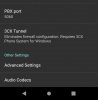
EDIT: in the app at "3CX Tunnel" it says "Requires 3CX Phone System for Windows".
I run my 3cx on a debian host. Is that the problem? I thought there was feature parity?
I have an android phone where I use the 3cx app. Whenever in the local lan (wifi) it works.
However when I am not in the local lan it does not connect (Waiting for network).
I activated "Use 3CX Tunnel for remote connections (3CX Client only)" on that extension.
I have (ONLY!) the Port 5090 forwarded on the firewall.
I get a lot of "icmp" packages on port 84 on the firewall (from my external phone ip), but no connection on port 5090.
The FQDN is resolved correctly (checked by pinging it from the android device).
I provisioned the android client with the QR-Code. In settings on the android client "Use 3CXTunnel when Out of office" is activated.
any tips?
thanks
Daniel
EDIT: in the app at "3CX Tunnel" it says "Requires 3CX Phone System for Windows".
I run my 3cx on a debian host. Is that the problem? I thought there was feature parity?