CUSTOM CERT ISSUE - 3CX apps on iOS provision fine, but Android will not.

Status
Not open for further replies.

bradcoats

Silver Partner
Advanced Certified
Joined
Jul 12, 2021
Messages
5
Reaction score
2
I have a newly installed 3CX system in a VM hosted on Hyper-V in an on-premise data center. This was installed by the most recent downloaded Debian-based 3CX installer image and is version 18.0 (Build 908). The system is up and running and firewall checker completes with 100% pass success. I can provision iOS phones without issue by scanning QR codes. I have attempted to scan the same QR codes with Android phones and am unable to successfully provision the 3CX mobile app. 3CX app indicates QR provisioning failed. If I scan the QR code on the same device with a code scanner and open the link in the browser, I am able to successfully download the file. If I try to open the file, it says "Failed to provision from a content file." When I open the file, all references to the PBX use the FQDN, which works properly in all external tests.

I've tried with the same QR code on multiple Android devices without success. I've used the same code on multiple iOS devices without failure.

I have permitted the following ports inbound through the edge firewall to the 3CX host from the Internet:
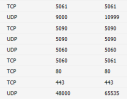
1679550287634.png

All outbound traffic from the 3CX instance to the Internet is permitted.

Any ideas / suggestions or experience with this Android issue would be more than welcome!

Thank you!
 
Are you trying over wifi or data?

ensure the IP (if GSM) isnt blacklisted.

Have you locked down your ports to IPs?

What version of 3CX and app are you using?
 
Are you trying over wifi or data?

ensure the IP (if GSM) isnt blacklisted.

Have you locked down your ports to IPs?

What version of 3CX and app are you using?
Thanks, Kieferschild! Tried from multiple IPs and devices, both via WiFi and mobile data. We have restricted inbound services from the Internet to 3CX to those ports listed in my original post, but have not restricted them to any particular IP address.

3CX is 18.0 Update 6. I'm getting the version of the Android app we were testing with and will update when I have that. It was the latest available in the Play Store for that device.

Thanks again!
 
When you load the webclient/qr code, are you loading it over http or https?

Ensure it's https (and so the prov file you download by visiting the link in the qr code should have https on the url).
 
When you load the webclient/qr code, are you loading it over http or https?

Ensure it's https (and so the prov file you download by visiting the link in the qr code should have https on the url).
Great thoughts -- confirming that it is https and the URLs in the file are all https as well.

No problems registering iOS devices or accessing the webclient. It's only Android devices that won't completely register.

Thank you!
 
What make/model android devices and what version of Android?
 
What make/model android devices and what version of Android?
Has been attempted myself with the following:
  • Galaxy Note10+ (SM-N975U) - Android 12 - 3CX App Version 18.1.3.135
  • Galaxy S22 (SM-S901U) - Android 13 - 3CX App Version 18.1.3.135
Can manually download the provisioning file to my phone and see the contents as being correct, but when attempting to scan the QR code, there is a "QR Provisioning Failed"

Another deployment using 18u7 is also experiencing the same issue.

Seems to be location agnostic as it has been tried internally, externally and with cellular.
 
Is this one for specific extension or all extensions exhibit this issue (meaning scanning the QR code of a new extension works on iOS but not Android)
 
Is this one for specific extension or all extensions exhibit this issue (meaning scanning the QR code of a new extension works on iOS but not Android)
Seems to be all extensions but I will say I have not tested every one. Have probably tested with 6+ extensions. To our knowledge this issue seems to be affecting 3 deployments at this point, but there doesn't seem to be any commonality between these issue deployments. We have other deployments configured identically with no issues on QR provisioning.
 
Seems to be all extensions but I will say I have not tested every one. Have probably tested with 6+ extensions. To our knowledge this issue seems to be affecting 3 deployments at this point, but there doesn't seem to be any commonality between these issue deployments. We have other deployments configured identically with no issues on QR provisioning.
Honestly, without getting hands on I'm all out of ideas, which is not something I say often. You've done everything I would do. My next steps would be to capture the traffic from the cell phone (you'll likely need something like squid and SSLBump) and see what's actually happening.

My guess is something that is blocked network side from reaching the PBX that's Android specific. Maybe the firewall in front of the PBX has a filter or something.
 
  • Like
Reactions: N_G
Hi @bradcoats and @trhoden

I also believe you have a ticket with 3cx Tech support correct?

Where it was asked that you kindly run some tests to try and narrow down where the issue may lie, so that we can provide you with steps to take to replicate and provide us with the data required to check for you, and we are awaiting your reply.

If you would kindly reply back on the ticket, with the results of the tests we asked you to perform if you are still experiencing this issue, so that we may request some data in order to check?
 
Hi @bradcoats and @trhoden

I also believe you have a ticket with 3cx Tech support correct?

Where it was asked that you kindly run some tests to try and narrow down where the issue may lie, so that we can provide you with steps to take to replicate and provide us with the data required to check for you, and we are awaiting your reply.

If you would kindly reply back on the ticket, with the results of the tests we asked you to perform if you are still experiencing this issue, so that we may request some data in order to check?
Thank you Charles,

I will continue these troubleshooting steps within the ticket.
 
Please do post back when you have a resolution as I've very curious as to what it ends up being.
 
  • Like
Reactions: Charles_3CX
Issue ended up being with the SSL certificate. Certbot w/ Let's Encrypt defaults to using the ECDSA key type when generating new TLSv1.3 certificates which is why we were only seeing the issue on new deployments. Converting these to RSA solved the issue.
 
Glad you found your issue with the help of Techical support.
 
Issue ended up being with the SSL certificate. Certbot w/ Let's Encrypt defaults to using the ECDSA key type when generating new TLSv1.3 certificates which is why we were only seeing the issue on new deployments. Converting these to RSA solved the issue.
Is this the built in 3CX SSL using their FQDN's or just straight linux certbot?
 
Is this the built in 3CX SSL using their FQDN's or just straight linux certbot?
We use custom FQDNs with the Linux Certbot to automate the renewals. Always going to use RSA moving forward for sure.
 
  • Like
Reactions: ThomasD_3CX
We use custom FQDNs with the Linux Certbot to automate the renewals. Always going to use RSA moving forward for sure.
Gotcha. Thanks for sharing.
 
Having this issue with an Android too - Note 9.
We just reinstalled from backup and it changed my ports from 80/443 to 5000/5001.
I tested the same code on an iPhone.
Any suggestions?
 
Issue ended up being with the SSL certificate. Certbot w/ Let's Encrypt defaults to using the ECDSA key type when generating new TLSv1.3 certificates which is why we were only seeing the issue on new deployments. Converting these to RSA solved the issue.

How do we fix this?
 
Status
Not open for further replies.

Forum statistics

Threads
111,974
Messages
590,081
Members
164,899
Latest member
mazet