Custom speed dial isn't working for 1 specific user

Status
Not open for further replies.

ElementalWindX

Bronze Partner
Advanced Certified
Joined
Oct 24, 2018
Messages
367
Reaction score
40
Newest 3cx, newest fanvil x5u firmware, all cloud hosted with debian. Have 1 user who has custom speed dial buttons and claims it won't work. Can't get an exact error out of the user. Copied the same blf button to another extension with another x5u and it works just fine.


Any idea how I can track this down via logs or whatever to figure out why it's not working? I checked the call log and it doesn't even show his extension making the call to the speed dial number.

Thanks.
 
Newest 3cx, newest fanvil x5u firmware, all cloud hosted with debian. Have 1 user who has custom speed dial buttons and claims it won't work. Can't get an exact error out of the user. Copied the same blf button to another extension with another x5u and it works just fine.


Any idea how I can track this down via logs or whatever to figure out why it's not working? I checked the call log and it doesn't even show his extension making the call to the speed dial number.

Thanks.
If you set it to any other type of keys, does it work?
 
  • Like
Reactions: NickD_3CX
"On that phone the BLF for Janice and I (internal calls) work, but he thinks that the external calls do not and he gets a 'cannot be found'"

According to the user...
 
Hi @ElementalWindX

1. When you say it does not work, can you describe the actual behavior? (I do "A", I expect "B" to happen, and "C" happens instead)

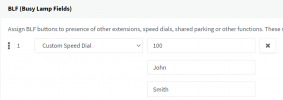
2. What type did you select? Custom Speed Dial and you entered an extension number like so?
1638947539865.png

3. Did the user perhaps not set it from 3CX, and instead manually made an entry from the phone itself?
 
1. They press the BLF button, I expect it should dial the outward DID entered for that button (someones cellphone #), but instead it just doesn't call. (The client doesn't tell me exactly what it does but it doesn't seem to dial out)

2. Custom speed dial, and the first field where 100 is, is the area code and phone number, such as 2525556666, and the name is filled in identically to your picture.

3. I set the BLF key myself.

Note we have this setup on other phones within this pbx and those phones work perfectly fine with this key.
 
That is a bit strange indeed. If you cannot see it in person, perhaps have your customer send you a small video of what happens when they press it.

If you checked the logs and did not see a call attempt its quite possible it was never sent by the phone
There's also the rather mundane possibility that the physical button is not working.

1. Move the same BLF to another position on the phone, this should eliminate a faulty button possibility
2. Move something else to the suspected button (ie. SP1), to cross-check whether it is faulty
3. Ensure the name does not have any special characters, Fanvils don't like that
 
Status
Not open for further replies.

Members Online Now

Forum statistics

Threads
111,835
Messages
589,288
Members
164,665
Latest member
dominik.pepel