custom system prompts - unable to upload file

Status
Not open for further replies.

greychain

Gold Partner
Advanced Certified
Joined
Jul 13, 2018
Messages
779
Reaction score
122
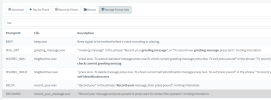
I have created a copy of the English prompt set and set it as active in the system prompt settings and then I have tried to upload a new file but am unable to. Which log will show me the reason why I am unable to upload?

The file is the correct format, I tried renaming it to thank_you.wav just incase it doesn't like spaces or upper case. Still no joy. I use an application call Switch Plus to format the file
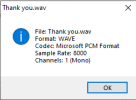
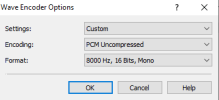
1676954915874.png
1676954996057.png
 
  • Like
Reactions: jed
no error, if I manually upload the file using ftp it works.
which is why I was asking about the log file I should be looking at

didn't know about the wav converter , thanks
 
3CX support do you have any suggestions?
 
Have you tried using Audacity? That is what I use and have never had a problem.
 
  • Like
Reactions: jed
The problem is not the format, it's that it wont upload via the GUI
 
I have done some testing on a different PBX and found that on a different PBX I can upload although there seems to be a bit of a delay and toggling the use alternate pronunciation may or may not help this work faster.

The only thing I can see now is the details are not updated in the gui, seems it renames the file to the existing name.

So it seems to be working but not on my system. Further testing
1677222139903.png

Seem this is expected behaviour

https://www.3cx.com/community/threads/replacing-audio-prompt.56727/
 
Last edited:
Status
Not open for further replies.

Forum statistics

Threads
111,974
Messages
590,081
Members
164,899
Latest member
mazet