Customer.3cx.com website inaccessible due to HSTS checking failure

Status
Not open for further replies.

Felicia King

Silver Partner
Advanced Certified
Joined
Jun 13, 2019
Messages
88
Reaction score
24
3cx.com website works fine
3cx.com/community works fine
https://customer.3cx.com has been prevented by all browsers since last week.
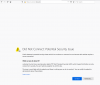
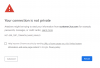
Firefox reports that customer.3cx.com has a security policy for HSTS and Firefox is not able to connect to the site securely, so therefore it does not load. The same thing happens in Chrome. I tested this on two other networks and found the same thing happening.
I contacted partner support and sent them a series of screenshots that show the problem. They literally are asking me if I am connecting to https://customer.3cx.com even though that URL is included in the screenshot.
I believe I first noticed this problem on 2/13/2020. It could have been happening prior. I don't visit that website every day.
 

Attachments

  • HSTS-Firefox.png
    HSTS-Firefox.png
    85.6 KB · Views: 19
  • HSTS-Chrome.png
    HSTS-Chrome.png
    56.3 KB · Views: 19
HSTS protection helps protect us all from SSL Strip type attacks.
I would never recommend that anyone disable the protections that exist in the browsers.
I do not consider it a viable option to disable security protections just to connect to what should be a professionally managed website that worked just fine last month.
Here are some articles that advise disabling security. Yeah, cause disabling security is always the best approach. *sarcasm*
https://www.thesslstore.com/blog/clear-hsts-settings-chrome-firefox/
https://appuals.com/how-to-clear-or-disable-hsts-for-chrome-firefox-and-internet-explorer/
 
Hi Felicia,

Are you sure that there isn't any local proxy or firewall (or someone) trying to intercept the connection? What SSL certificate are you being served? Please post a screenshot. Also make sure customer.3cx.com is resolving to the correct IP address.

You do not need to disable anything to connect to a site which is using HSTS. To the contrary, HSTS prevents connecting to a site via an insecure connection. That is why you are seeing that message.

If you tried connecting from the same computer but on different networks it may not make any difference if the wrong settings have been cached by your browser. Since nothing has changed on our end I would suggest troubleshooting this on yours.

p.s: if for whatever reason you need to clear the HSTS settings of a domain it does not mean disabling "security".
 
  • Like
Reactions: BrenttG
I concur, do not disable or exempt the security settings, you likely have something with your browser settings, or proxy settings gummed up, gotten any sketchy downloads or popups lately?

We use that site at least once a day and i just checked again to be sure, its working fine for us on firefox and chrome, perhaps review the mentioned browser settings and also do a full virus and malware scan as there are many pieces of malware that will proxy your browser in order to serve you ads, or spy on you without you knowing it.
 
There is no local proxying going on. In fact I setup a network security rule that allowed all egress traffic to customer.3cx.com on 80 and 443 and there is no behavioral difference in the browsers. This is happening in Firefox and Chrome, so not an issue associated with just one browser.
I remoted into computers in other networks for the testing. It all behaved the same on those networks. So the test was three different computers, three different networks, testing with both browsers in each case.

Script safe indicates that there is nothing else trying to load in Chrome, only the website.
The only updates that have happened recently are the latest Windows updates of last week plus new Firefox and Flash.
 
Hi Felicia,

I understand what you are saying but we haven't changed anything on our end and nobody else has reported a similar issue.

I still believe that the first step to troubleshoot would be to confirm that the certificate you are receiving is the correct one (don't check only the domain) and that the domain resolves to the correct IP.

As a second step, do clear the HSTS settings on one of the browsers and try again.
 
There is no local proxying going on. In fact I setup a network security rule that allowed all egress traffic to customer.3cx.com on 80 and 443 and there is no behavioral difference in the browsers. This is happening in Firefox and Chrome, so not an issue associated with just one browser.
I remoted into computers in other networks for the testing. It all behaved the same on those networks. So the test was three different computers, three different networks, testing with both browsers in each case.

Script safe indicates that there is nothing else trying to load in Chrome, only the website.
The only updates that have happened recently are the latest Windows updates of last week plus new Firefox and Flash.

Though this is rare, are the computers you are testing with on a Active Directory Domain? If so, investigate your group policy and certificate services because if one of your admins made a snafu in there it could potentially propogate either a bad certificate, or a bad SSL/TLS setting across the computers, its an extreme case out of left field but i have seen it happen before when a tech who was not qualified to be working on an AD Domain Controller wanted to spin up a little internal intranet site and started playing with certificate settings on there trying to get a certificate loaded to use with the website.

A quick check would be try it with a non-domain joined computer.
 
  • Like
Reactions: JohnS_3CX
I found where the issue was.
3CX moved a bunch of their hosting resources last week. They moved them to Italy. Clearing HSTS settings had zero effect.
I had to edit the geoIP blocking exceptions list to allow customer.3cx.com. And then for the geoIP blocking policy that applies to the Phone VLAN, I set an exception for that plus activation.3cx.com.
But that is what it was. 3CX moved their hosting resources to a different country.
I wish that 3CX would actually either know their own infrastructure better, or publish a list of FQDNs and IP ranges the way that Microsoft does. I do not subscribe to the philosophy of blanket whitelisting IP ranges. But I do know that we run 3CX in a hardened configuration which has protected it against hacking. Part of that is to allow the PBX-related resources to only talk to what they legitimately need to talk to. And because 3CX has NO documentation that actually describes how their PBX behaves in terms of what it talks to WAN resources, we had to reverse engineer that through traffic monitoring and testing.
So the positive side is that I have a comprehensive list of FQDNs that the PBX talks to.
The PBX also has certain hardcoded features like sets of time servers that it wants to talk to on the internet rather than using an NTP source that you provide or even being efficient about finding an NTP source within the same country as the PBX.
That's the worst one. It wants to talk to NTP sources all over.
As of right now, it does not look like they moved any of their other hosting resources.
I know of other companies that have found the only way their security requirements have been met is to refuse connection to the PBX except via VPN. I would argue that does not actually secure the server-side of the PBX functions. Whether or not they ever went through the effort to thoroughly harden the network traffic to/from the PBX, I don't know. But I do know that 3CX defaults also did not match their security requirements.
Penetration testing that I did when I was first evaluating the PBX revealed that phones could be hacked with SIP Vicious from external connections when using the 3CX recommended network rules.
I wish that 3CX would hire a network security architect that would help them flush out these issues and get resolutions in place for them. They could reach out to us partners that have already solved the network layer security risk issue.
 
  • Like
Reactions: AWS2P
Hi Felicia,

I will try to address you concerns below.

3CX moved a bunch of their hosting resources last week. They moved them to Italy.
All 3CX online services run in large Hosting Providers. I have double-checked and no changes or moves have been made recently.
I know this does not answer your "then why did it happen?" question, but at least you can rule out this possible cause.

I wish that 3CX would actually either know their own infrastructure better, or publish a list of FQDNs and IP ranges the way that Microsoft does.
We have this information publicly available in our Academy page: https://www.3cx.com/3cxacademy/videos/basic/installing/
(Slide 10)
This information would also be happily provided to you if you had contacted our Support Team as well.
The actual 3CX server may try to contact other online resources, but this will be due to other configurations of the OS.

The PBX also has certain hardcoded features like sets of time servers that it wants to talk to on the internet rather than using an NTP source that you provide or even being efficient about finding an NTP source within the same country as the PBX.
That's the worst one. It wants to talk to NTP sources all over.
The PBX software itself for NTP uses the time server configured on the OS, whatever that is. You may however have spotted in Settings --> Parameters, a parameter called "TIME_NTP_SERVER" which contains the value pool.ntp.org.
I can see how some may think this is what the PBX uses, but that would wrong. This value is passed onto the phones via their Provisioning Template, so the phones (not the PBX) use this NTP.
Having said this, feel free to change this to any other NTP server you want and reprovision your phones, then the phones will use the NTP you have defined.

But I do know that 3CX defaults also did not match their security requirements.
Penetration testing that I did when I was first evaluating the PBX revealed that phones could be hacked with SIP Vicious from external connections when using the 3CX recommended network rules.
We as 3CX extensively pen test and stress test our software constantly in between releases and before releasing a new Update. If you have found any potential vulnerabilities that directly affect the PBX software, then I would suggest you to open a Support Ticket with our Support Team and the information you give us will be analyzed, verified and sent to the Dev Team if indeed there is some vulnerability.
We also collaborate with a number of IP Phone manufacturers. We do also run some pen tests on these devices and report any findings to the vendors. It should be noted though that the main pen testing on IP Phones devices is done by the IP Phone manufacturers, who in turn help create the template we end up bundling with our software. Likewise, if you have found any vulnerabilities with specific IP Phones, you can either contact the manufacturer directly, or again, open a Support Ticket with your findings, which will be analyzed, verified and sent to the corresponding manufacturer, with which we have a good working relationship (with the Support IP Phones).

I wish that 3CX would hire a network security architect that would help them flush out these issues and get resolutions in place for them.
I will just boil this suggestion down to your frustration with the issue you were facing. :)
 
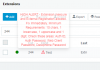
@Felicia King the last time i saw sipvicious having any success against 3CX was in 3CX version 15. That being said, if you have updated PBXs to the newer versions that used to be version 15, but not changed/updated the sip authentication details to stronger versions like 16.0 and higher recommend, (3cx even shows the little red exclamation point on any extension that violates the new security policy), Then i recommend doing this so that all the extensions meet the new security policy, unless this has been done, many extensions could still have security concerns. But this isnt because 16 is vulnerable, its because you have old legacy credentials still in use that need to be hardened up.

1582225120791.png

Hope this helps you ;)
 
Last edited:
To go a step futher, here is a simple process for updating those legacy credentials quickly and efficiently.

Required Prerequisite: Ensure the DHCP Server local to the phones has option 66 setup for auto-provisioning.

Recommend you perform these steps 1 extension at a time so only a phone or two are offline at a time, rather than doing them rapidly and having a large number of phones going offline faster than onsite personnel can re-provision them.
1. Change the values on an extension that violate the security policy, note that once you click save the phone will likely drop offline, and may even become blacklisted if you do not have its range or external ip whitelisted already.
2. Have someone onsite factory reset the phone so it auto-provisions and pulls its new updated credentials.


Some have reported being able to quickly change the creds, and then jump to the phones page and hit the re-provision button before it drops offline and have it pickup and not need manual intervention, in this instance though i would not assume that this is viable, and would not continue without boots on the ground local to the phones to assist in case it doesn't.
 
Status
Not open for further replies.

Forum statistics

Threads
111,938
Messages
589,836
Members
164,821
Latest member
M_R