Customers uploading their own recordings for voicemail/digital receptionist use?

Status
Not open for further replies.

MPServeline

Bronze Partner
Basic Certified
Joined
Mar 1, 2022
Messages
115
Reaction score
14
Hi all,

We're still acclimatizing to 3CX from another hosted phone system whereby end users could upload a recording by using a shortcode and pin which we can then allocate as required

I'm still trying to work out ways in which the end users can create their own voicemail recording or upload their own messages e.g. holiday messages? I can see recordings can be managed and there is a record option as well within the PBX under the admin login. What methods (assuming there are some) are there for users to upload recordings and what permissions would be needed (if any) for them to be able to do so?

Many thanks
 
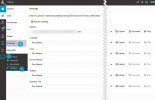
For Voicemail greetings users can actually just use the 3CX Webclient/Destkop App to upload or record their own greeting:
1650378250760.png


If they only have IP Phones, they can call the Voicemail Menu and record a new message from there:

• Dial Voicemail menu 999/666
• Enter Pin
• Press 9 for Options
• Press 8 to record new voicemail greeting


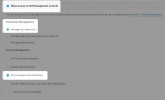
For users to be able to change IVR prompts however, they would need access to the 3CX Management Console and with Phone System administration rights:

Required Rights:
1650378625901.png

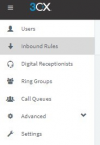
Options visible to user with Phone System Administration rights:
1650378661278.png
 
We set up a dummy extension and ask users to leave a voicemail with their prompt. When we get it in an email we upload where needed.
 
From your question, I assume you do not give access to the 3CX console since this is the typical way of updating prompts.

End-users can record their own voicemail prompts by logging into their voicemail box from their phone.

To enable end-users to create new prompts for an IVR, you could create a Call Flow Designer (CFD) application that utilizes the recording component. The idea being that the end-user records the new prompt, then you, as the 3CX administrator, assign the prompt to the appropriate IVR.

You could take the CFD application a step further to actually assign the prompts to a specific IVR, but that would require C# and the use of the Call Control API to assign the prompt. We did something similar years ago with a "Job Line" IVR that played a list of newly available jobs.
 
  • Like
Reactions: MPServeline
For Voicemail greetings users can actually just use the 3CX Webclient/Destkop App to upload or record their own greeting:
View attachment 29599


If they only have IP Phones, they can call the Voicemail Menu and record a new message from there:

• Dial Voicemail menu 999/666
• Enter Pin
• Press 9 for Options
• Press 8 to record new voicemail greeting


For users to be able to change IVR prompts however, they would need access to the 3CX Management Console and with Phone System administration rights:

Required Rights:
View attachment 29600

Options visible to user with Phone System Administration rights:
View attachment 29601
Thanks ChrisC, really appreciate the detailed response. I think we need to find a way to try out the desktop/web app as we're on a different network to all our 3CX customers and all the set ups were done by someone who has left our business so we're on a very steep learning curve at the moment.
 
  • Like
Reactions: Asteck
Thanks kieferschild and Voiptools, excellent suggestions. Will give those a go.
Previously we would often either upload recorded WAV files to our PBX once converted to the right format which were either recorded by the customer or ourselves using Windows based apps and a headset.
 
Also, an alternative method of uploading IVR prompts would be to:

1. Have the user create the prompt in the correct format as per @kieferschild link and upload it via the 3CX Webclient/Desktop app as a voicemail greeting message to one of the Profile statuses.
2. Then you as the administrator log into the 3CX MC
3. Go to the extension who uploaded the prompt and then to forwarding rules
4. Select the profile status it was uploaded for
5. Next to greeting click on Manage and download the newly created prompt (maybe also set the greeting of this profile status back to the default one)
6. Then go to Digital Receptionists and upload the prompt you just downloaded.
 
  • Like
Reactions: MPServeline
Thanks both, much appreciated
 
  • Like
Reactions: ChrisC_3CX
Status
Not open for further replies.

Forum statistics

Threads
111,974
Messages
590,083
Members
164,900
Latest member
Silent_Guru