Solved D735 Firmware Upgrade Fails

Status
Not open for further replies.

jcostlow

Gold Partner
Advanced Certified
Joined
Jul 11, 2020
Messages
396
Reaction score
152
  • 3CX Version, 18.0.2.315
  • Server OS, Windows 10 Pro
  • Is the 3CX Server Hosted and where? On-premises
  • IP Phone Make/Model/Firmware version, Snom D735 10.1.73.16
  • Provisioning Method: Local
  • Trunk Provider or VoIP Gateway Make/Model, Net2Phone
  • Has the Firewall Checker passed: YES
  • Are custom Phone Templates being used: YES
After upgrading this customer from v16 to v18 I tried to upgrade the firmware on the phones. This is failing if I push from 3CX but works if I login to the web UI and manually update from the 3CX website.

I looked at the logs on the phone and saw this alert/error:
Feb 21 22:44:10.663 [ALERT ] WEBCLIENT: request http://10.3.0.20:5000/provisioning/fedpiq1o59o28/firmware/snom/snomD735.xml stopped due to no response from server for con_id:4; resending with timeout 10614 ms

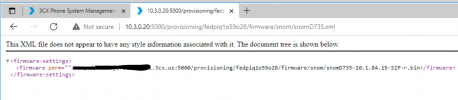
If I go to that link the the web browser I get this:
Screen Shot 2022-02-21 at 11.00.14 PM.png

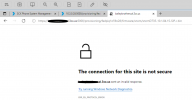
If I go to the link listed in firmware-settings I get an SSL error. Management console works fine. I am not sure where to go from here other than possibly re-installing 3CX. Any ideas/help is appreciated.
Screen Shot 2022-02-21 at 11.00.57 PM.png
 
Hi,

If I go to that link the the web browser I get this:
Clearly the server is able to serve that file, so the question is why cannot the phone reach it from its current network location?

If I go to the link listed in firmware-settings I get an SSL error. Management console works fine. I am not sure where to go from here other than possibly re-installing 3CX. Any ideas/help is appreciated.

https does not exist on port 5000, it only exists on 5001 so you are not expected to find anything there at all. I can't really see what's behind it, is there an HTTPS there or just plain HTTP?
1645520817448.png

You also mentioned you are using custom templates. Why not reset a single phone and assign it to a fresh extension using the default templates and then see how it goes from there?
 
That is my bad I should've mentioned I have tried with phones that have the custom template and default 3CX templates.

That string does say http on port 5000 but when I go to it I get redirected to https. When it redirects me the port stays on 5000 instead of going to 5001.
 
That string does say http on port 5000 but when I go to it I get redirected to https. When it redirects me the port stays on 5000 instead of going to 5001.
ok then its correct, it's just your browser is automatically switching you to https

Are you using split DNS on your network?
 
Thanks! I was using split DNS but after you asked that I did an nslookup and it wasn't resolving the internal IP. Checked the AD domains DNS and someone deleted my zone.

After recreating the zone, pointing to the local IP, clearing dns cache and browser cache the web browser gets redirected and downloads the file. I will test with the phones next.
 
  • Like
Reactions: JohnS_3CX
Sounds about right. Reboot the phones so they can perform fresh DNS requests.
They should now resolve to your internal IP as expected.

Before, they were probably resolving the external IP, and trying to access it from within your network. Usually hairpin traffic is blocked, so they were never reaching the PBX to download the file.
 
Thanks. I sent a firmware update to the phone before rebooting and it updated successfully. I didn't check the DNS as I had set it up a while back and didn't think anyone would delete it but this is one of our few clients on break/fix instead of monthly managed so their in house IT must've done it.

The SonicWall does block hairpin traffic like you mentioned. All is working now and I appreciate your help.
 
Glad to hear all is well!
 
Status
Not open for further replies.

Forum statistics

Threads
111,832
Messages
589,280
Members
164,662
Latest member
DejanMDS
