DC/DR Failover

TayZaLinZaw

Platinum Partner
Advanced Certified
Joined
May 30, 2024
Messages
49
Reaction score
5
Hi 3CX Team ,
I already know about that Failover scenario. They have a total of 3 VMs , 2VMS in DC side and 1 VM in DR side .
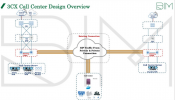
If Primary DC01 Server failed , it'll swing to Secondary Server DC02, but DR side has a VM which is installed 3CX PBX. DC01 and DC02 will work with same license key, and I'm understand about that . So, I just want to clarify about DR Side, it needs license or not ( 3CX Support one license key with 2 different VMs not 3 ) .please take a look at Our Customer Call Center overview Design .
1738667242453.png
 
The failover will only work on 2 machines. For the 3rd one offsite you would need to have a backup handy and kick it into action only as needed when the other 2 have totally gone down.

This will however be a manual process so it doesnt interfere with the existing Failover scenario.
 
Are you using extended replication in your virtualisation? you can have up to 3 replicas in hyperv last time I played with it.

I cant imagine anything would come of it if your 3rd VM was sat offline and only came on if it was the last surviving vm of your 3CX.
 
  • Like
Reactions: TayZaLinZaw
The failover will only work on 2 machines. For the 3rd one offsite you would need to have a backup handy and kick it into action only as needed when the other 2 have totally gone down.

This will however be a manual process so it doesnt interfere with the existing Failover scenario.
Just need to clarify about that
1. DC01/ DC02 will run with same license for Failover Scenario ?
2. If DC01 and DC02 failed , We need to do manual work for backup and restore DR Side right ?
3. Overall process , Customer have 3 Vms , 2 for DC/DR Failover and 1 for DR side .
4. Does the secondary server have to be shut down while the primary Server is running ?
 
Hello, I have a question.
So basically Server 2 only has data of the Primary from the sync data say 12midnight.
if for example, primary 1 goes down @ around 3pm, the only data secondary has is the data from yesterday, right? it won't have the data from past 12mn to 3pm of the same day?
 
Hello, I have a question.
So basically Server 2 only has data of the Primary from the sync data say 12midnight.
if for example, primary 1 goes down @ around 3pm, the only data secondary has is the data from yesterday, right? it won't have the data from past 12mn to 3pm of the same day?
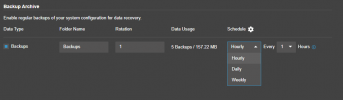
That is partially correct. In Version 20 the backp and restore procedure can be also be done on an HOURLY basis.

1738740701836.png
 
I found pre script document for failover state.What script are we using for it ? This is my first time configuration for failover. Customer is so urgent about to test this . Please help me guys.
 
Basically when the secondary machine takes over from the active server it needs to have a way to inform the clients (phones and apps) that the PBX machine is different. This is done via the FQDN of the PBX.

There should be an internal DNS entry to resolve the FQDN of the PBX to the internal IP Address of the server. When the secondary machine takes over it will run the script to tell the DNS server that the FQDN of the PBX should now resolve to its IP address.

The same would happen to tell the firewall to change its port forwarding to this servers IP.
 
  • Like
Reactions: TayZaLinZaw
Just need to clarify about that
1. DC01/ DC02 will run with same license for Failover Scenario ?
2. If DC01 and DC02 failed , We need to do manual work for backup and restore DR Side right ?
3. Overall process , Customer have 3 Vms , 2 for DC/DR Failover and 1 for DR side .
4. Does the secondary server have to be shut down while the primary Server is running ?
Let me clarify about No.1 and 4 .
3CX support one license key for 2 Different VMs. So, If primary server is running, secondary server need to be shutdown or service shutdown?
 
Yes, it is one license, as it is the same configuration.

Once you enable the failover the services on the secondary machine will be stopped and will be monitoring the active machine. It has to be on in order to monitor the active server. Otherwise its not running as a failover, but just as a cold standby machine.

The procedure for the setup is at https://www.3cx.com/docs/failover/
 
  • Like
Reactions: TayZaLinZaw
Yes, it is one license, as it is the same configuration.

Once you enable the failover the services on the secondary machine will be stopped and will be monitoring the active machine. It has to be on in order to monitor the active server. Otherwise its not running as a failover, but just as a cold standby machine.

The procedure for the setup is at https://www.3cx.com/docs/failover/
3CX Web client login password is same for these 2 VMs , but Password is incorrect in secondary server. Could it be possible because Same license same config.....?
 

Latest Posts

Forum statistics

Threads
111,962
Messages
589,996
Members
164,867
Latest member
swegner