Debian v20 ISO - package manager error

Alphabetic

3CX MVP
Silver Partner
Advanced Certified
Joined
Jul 1, 2016
Messages
6,561
Reaction score
2,573
Hi support
im using the iso to install 3cx and im getting the following:
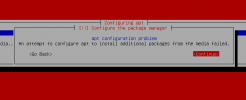


1738151839222.png


I can click continue, select UK > deb.debian.org and then it continues as normal.

I get all the way to 3cx, set it all up, access it from the internet but when I check updates it doesnt show me the latest beta. (5)
 
Hi @Alphabetic
Just spun one up using the ISO and everything went smoothly.
To get to the root of the error, a deeper investigation is needed but it could be something as simple as a temporary network interruption

Regarding not seing latest Update 5 Beta
Note that ISO currently installs Update 4
From Update 4 you will be seing Update 5 Alpha and not directly Update 5 Beta.
If this is the case, you will need to go through the update chain.
Once you update to Update 5 Alpha, you will see Update 5 Beta
 
Hi @Alphabetic
Just spun one up using the ISO and everything went smoothly.
To get to the root of the error, a deeper investigation is needed but it could be something as simple as a temporary network interruption

Regarding not seing latest Update 5 Beta
Note that ISO currently installs Update 4
From Update 4 you will be seing Update 5 Alpha and not directly Update 5 Beta.
If this is the case, you will need to go through the update chain.
Once you update to Update 5 Alpha, you will see Update 5 Beta
Hi Marios,

how do I get it to see the next update as it just says im up to date.

Im trying to set up failover and cannot restore as active is newer.
 
Can you verify what Version you see in your Dashboard? Is it Version 20.0 Update 4 (Build 487)?
If yes, you should be able to see Update 5 Alpha

From where do you see that you are up to date? From Dashboard > System Maintenance Section?
Cause Dashboard will not notify you for Alpha/Beta versions. It will say that you are up to date.
Only for final versions it will notify you in the dashboard.

Better navigate to System > Updates and confirm you don't see it there

So to summarize, if on dashboard > System Information Section, you see that you are in 20.0.4.487 but in System > Updates you don't see Update 5 Alpha, then more investigation is needed, but better confirm

If this is not the case, a possible explanation, if indeed there are network interuptions, is that the PBX was not able to contact our downloads server on startup. In which case it will try again periodically so eventually you will see the update.
Or you can try restarting Management Console Service and navigate again to System > Updates to force the check again
 
So I downloaded the ISO again and tried to no avail.
Instead of using DHCP to configure the network, I manually set it up - same thing.
Reinstalled it now i'm looking at the dashboard.

Version 20.0 U4 B478

Firewall test has passed.

Update page says "Youre up to update, last updated: Today, 13:26"
 
Code:
Hit:1 http://repo.3cx.com/debian/2004 bookworm InRelease
Hit:2 http://repo.3cx.com/debian-security/2004 bookworm-security InRelease
Get:3 http://repo.3cx.com/3cx bookworm-testing InRelease [13.8 kB]
Hit:4 http://repo.3cx.com/3cx bookworm InRelease
Get:5 http://repo.3cx.com/3cx bookworm-testing/main amd64 Packages [4,144 B]
Err:5 http://repo.3cx.com/3cx bookworm-testing/main amd64 Packages
  File has unexpected size (4332 != 4144). Mirror sync in progress? [IP:x.x.x.x]
  Hashes of expected file:
   - Filesize:4144 [weak]
   - SHA512:ac80ccb7c37010528d8faf9be3b2d1f3e2c5b440a137b5963d89734ac579cad12be4f986bc4842ba127d75a3bcc5a1bb13e47ee937d8acd7fcb75b8015c0a06f
   - SHA256:9e074c51c5409b86b3a8b738f9d44390dc2eaeb2539a869c0b520d6cd1adba22
   - SHA1:099ae91937c9f4bd17027371f4d81e3a18ec060c [weak]
   - MD5Sum:b78a59615ff2a81e8cb39a87d0e5e842 [weak]
  Release file created at: Thu, 19 Dec 2024 08:55:00 +0000
Reading package lists... Done
E: Failed to fetch http://repo.3cx.com/3cx/dists/bookworm-testing/main/binary-amd64/Packages.bz2  File has unexpected size (4332 != 4144). Mirror sync in progress? [IP: x.x.x.x]
   Hashes of expected file:
    - Filesize:4144 [weak]
    - SHA512:ac80ccb7c37010528d8faf9be3b2d1f3e2c5b440a137b5963d89734ac579cad12be4f986bc4842ba127d75a3bcc5a1bb13e47ee937d8acd7fcb75b8015c0a06f
    - SHA256:9e074c51c5409b86b3a8b738f9d44390dc2eaeb2539a869c0b520d6cd1adba22
    - SHA1:099ae91937c9f4bd17027371f4d81e3a18ec060c [weak]
    - MD5Sum:b78a59615ff2a81e8cb39a87d0e5e842 [weak]
   Release file created at: Thu, 19 Dec 2024 08:55:00 +0000
E: Some index files failed to download. They have been ignored, or old ones used instead.

Should this be erroring?
 
No that should not throw an error.
Definetly this is why you don't see the update but need to understand why you get this.
I'll PM you some commands to try and troubleshoot
 
Code:
auxfiles
deb.debian.org_debian_dists_bookworm_InRelease
deb.debian.org_debian_dists_bookworm_main_binary-amd64_Packages
deb.debian.org_debian_dists_bookworm_main_i18n_Translation-en
deb.debian.org_debian_dists_bookworm-updates_InRelease
deb.debian.org_debian_dists_bookworm-updates_main_binary-amd64_Packages
deb.debian.org_debian_dists_bookworm-updates_main_i18n_Translation-en
deb.debian.org_debian-security_dists_bookworm-security_InRelease
deb.debian.org_debian-security_dists_bookworm-security_main_binary-amd64_Packages
deb.debian.org_debian-security_dists_bookworm-security_main_i18n_Translation-en
lock
partial
repo.3cx.com_3cx_dists_bookworm_InRelease
repo.3cx.com_3cx_dists_bookworm_main_binary-amd64_Packages
repo.3cx.com_debian_2004_dists_bookworm_InRelease
repo.3cx.com_debian_2004_dists_bookworm_main_binary-amd64_Packages
repo.3cx.com_debian-security_2004_dists_bookworm-security_InRelease
repo.3cx.com_debian-security_2004_dists_bookworm-security_main_binary-amd64_Packages

This was what was present before the purge.
 

Latest Posts

Forum statistics

Threads
111,962
Messages
589,995
Members
164,867
Latest member
swegner