• We do not provide troubleshooting help for unsupported phones. Please try with a supported phone.
  • V20 Update 10 Alpha 2 Learn more

Solved DECT Phone listed multiple time, how to remove?

Status
Not open for further replies.

JimNX

Customer
Joined
Mar 21, 2021
Messages
27
Reaction score
4
Using 16.0.8.9

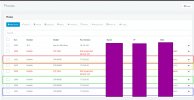
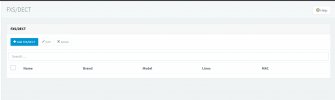
I added a Yealink W60B and W56H DECT phone to my system and now it's in the phone list 4 different times. I've deleted the entire phone from the DECT page but the phone and its MAC are still listed under phones with each row showing as assigned to different extension. How can I clear out this clutter?
 
Other than cosmetic, what is the actual problem?

Deleting the handset from the DECT base web page does nothing. The handset connects to the base, the base connects to 3CX.

What are you trying to accomplish?
 
I'm not having any problems as far as I can tell, it's just clutter in the list of phones, and it appears to be assigned to 4 different extensions.

Clarification: I removed the entire base from the DECT page in 3CX, I did *not* remove the handset from the base through the base's web GUI.
 

Attachments

  • dect.jpg
    dect.jpg
    215.1 KB · Views: 10
  • phone.jpg
    phone.jpg
    788.1 KB · Views: 10
Gotcha. So at some point someone configured those extensions to the base. If you don't want them showing up, you could factory reset the base which would remove all configuration causing the base to register to 3CX.
 
  • Like
Reactions: JohnS_3CX and JimNX
That makes sense. Thank you!
 
Status
Not open for further replies.

Forum statistics

Threads
112,147
Messages
590,959
Members
165,167
Latest member
Finatra.us