Diagnose issues with 3CX SBC

Status
Not open for further replies.

Philip Darnell

Joined
Jan 26, 2017
Messages
155
Reaction score
10
Hi

I have just installed a 3CX SBC on Raspberry Pi with 20 extensions, I am having a couple of issues with the voice cutting out for literally a split second, it happens probably once per call, and they miss about 1/4 of a word.

I have listened to the call recordings on the hosted server and there is no issue with the recording, so it is when it is coming into the remote network. I have QoS setup TCP / UDP on port 5090 for the SBC, Do I need to specify any QoS on the phones?

How do I diagnose voice issues on the Raspberry Pi SBC?
 
Hello @Philip Darnell

depending on the phones you have you could run a pcap on the phones to see if the audio reaches the phone broken or perhaps it is the handset that causes the small cut off. You could also run a pcap on the Raspberry PI and compare the audio.
 
I would suspect it is an issue with the call coming from the remote router to the SBC, how can I run PCAP on the Raspberry Pi? It doesn't happen on every call so will need to leave it running for about 30 mins, or is this not recommended?
 
an PI is not capable for running a Pcap for that long and will cause false errors while executing.
 
You could install a dummy hub in front of any of the phone, SBC, firewall and run wireshark. Its kind of a pain in the butt, but it will work.Then on the wireshark specify in the capture setting the IP addresses you are monitoring.
 
You could install a dummy hub in front of any of the phone, SBC, firewall and run wireshark. Its kind of a pain in the butt, but it will work.Then on the wireshark specify in the capture setting the IP addresses you are monitoring.

Thanks for the reply.

I'm very new to using wireshark so not got a vast knowledge on how to use it. Are you saying install wireshark on a dummy PC on the network, run wireshark on that PC and specify the IP Address of the SBC and it will capture the traffic to that IP?
 
Devices that are real hubs; convenient for capturing:confused:

Up until now, the 3CX SBC was available on Windows and Raspberry Pi. With this latest release the 3CX SBC also supports Debian 8! We know this is something that many users have been waiting for and once again we delivered!
 
Thanks, I've made some changes to the QoS so hopefully that helps.

Also ordered a second broadband to run the phones seperate from the data but will take 2 weeks before installed.
 
Please keep us updated with the results
 
do an "apt-get install htop" and then as SU run htop. It will show you if the PI is stressed. 20 phones is possible but you're approaching the edge of the PI's happy zone. Consider using any Intel-based platform with Debian for an SBC. The PI is wonderful but its more of a pony than a horse.
 
The actual problem with the Pi I remember reading about is the way the LAN port is connected. Apparently on the chip it is connected to the USB 2.0 chip, so even though it is a 100MBit port, realistically it is much less. I was also mentioned that when faced with high traffic, it may cause dropped packets which for other non-real time applications might be OK, for VoIP it's not.

I completely agree with @DSXDATA but for a slightly different reason, 20 phones is reaching the Pi's "happy zone".
 
do an "apt-get install htop" and then as SU run htop. It will show you if the PI is stressed. 20 phones is possible but you're approaching the edge of the PI's happy zone. Consider using any Intel-based platform with Debian for an SBC. The PI is wonderful but its more of a pony than a horse.

Thanks for this I will try it. They don't have a massive volume of calls, with the 20 phones there are probably only 4 sim calls at any time, so I would have thought the Pi was sufficient.

The actual problem with the Pi I remember reading about is the way the LAN port is connected. Apparently on the chip it is connected to the USB 2.0 chip, so even though it is a 100MBit port, realistically it is much less. I was also mentioned that when faced with high traffic, it may cause dropped packets which for other non-real time applications might be OK, for VoIP it's not.

I completely agree with @DSXDATA but for a slightly different reason, 20 phones is reaching the Pi's "happy zone".

When digging further I realised the issue was calls between sites, Site A (Has the Pi SBC) Site B (setup as STUN), because there was VPN connection between the two sites, I think the phone was trying to deliver the audio itself because obviously it knew the address of the other phone. I have now enabled 'PBX delivers Audio' for Site B that is STUN and it seems to be alright.
 
  • Like
Reactions: NickD_3CX
I ran htop and attached the screenshot, to me it looks like it is coping fine?

Still having some audio issues
 

Attachments

  • Capture.JPG
    Capture.JPG
    26.2 KB · Views: 10
They do have some Yealink W52Ps there which they have never had an issue with, the issue seems to persist on the Yealink T27G.

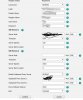
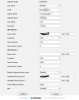
When I look on the account on the phone the Yealink W52P are setup slightly different, Server IP is the SBC local IP and then the proxy server is the SBC local IP, whereas the T27Gs server IP is the FQDN and then the proxy server is the SBC local IP.

Is this right?
 

Attachments

  • T27G.jpg
    T27G.jpg
    67.5 KB · Views: 14
  • W52P .jpg
    W52P .jpg
    59.8 KB · Views: 10
Although both work (at least for now), the correct is that of the T27. I don't think though this is what is causing the audio problems.

The interesting though is that the issue happens only on calls between the 2 sites. "PBX Delivers Audio" for all remote STUN extensions was the right thing to do, I personally recommend always doing this as it shouldn't work in another way anyway, this way you just ensure that it does.

To try now and isolate where the problem is call *777 from an extension that goes through the SBC. The user should hear their voice back of whatever they say. Ask them to check check if the audio is being sent back to them in tact.
Then do the same with the remote STUN extension.

This ways you can "split" the call and check the call quality SBC <----> PBX and PBX <----> STUN separately, then know which part to focus on.
 
The W52P was setup by copying the Provisioning link, whereas the T27G were setup from the management console, so I assume thats why it's worked like that.

I will get them to try the *777 from both sites and see how it goes.
 
If they dial *777 from behind the SBC, will the audio be delivered by the server or just go to the SBC and then back to the phone?
 
Status
Not open for further replies.

Forum statistics

Threads
111,878
Messages
589,525
Members
164,728
Latest member
Depo Dore