Dial by Name Directory Non-Functional

Status
Not open for further replies.

epowers

Customer
Joined
Feb 16, 2022
Messages
12
Reaction score
1
Greetings!

When a caller is transferred to our after-hours IVR, we have them press 3 to access the Dial by Name option. When they do that, they are prompted to press1 for name and 2 for last name. I press 1 and then enter "374" to find a user with a first name of "Eric", but I get "no extension found". I tried several other names and none of them work.

  • 3CX Version, - 18.0.3.461
  • Server OS, 3CX OVA Image for VMware.
  • Is the 3CX Server Hosted and where? - On Prem
  • IP Phone Make/Model/Firmware version, Yealink T54W - 96.86.0.72 & DesktopApp 18.8.508
  • Provisioning Method: Local
  • Trunk Provider or VoIP Gateway Make/Model, Twilio Elastic SIP Trunk
  • Has the Firewall Checker passed: YES
  • Are custom Phone Templates being used: NO

Any ideas?

Thanks!
 
Last edited:
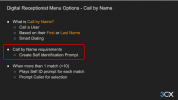
The self identification prompt is a requirement for this feature to be active on a user.

From the Academy:

1656668767898.png

Speaker note of above slide:

Another option, which was shown in the screenshot of the previous slide but was not mentioned, is the “Call by Name” feature. This feature provides the caller with the option to call an extension, even if they do not know the extension number.

The dialing is done based on the configured last name of the extension. The caller will be prompted to enter the 1st 3 digits of the last name of the person they wish to contact.

This provides small companies, without DIDs, to have smart dialling capabilities, where they will be able to be contacted directly, without needing to go through a receptionist.

To enable the Call by Name feature to dial an extension, you will need to record Self Identification Prompts via the voicemail menu of an extension. The user will be able to record their name, to be used in the identification of the extension in the call by name menu.

The Self Identification Prompt will only play when there is more than one match for the 3 digit number the caller entered.

For example:

David Smith and Wayne Rogers both have surnames that can be accessed by dialing 764. In this particular case, their Self Identification Prompts will be read out and the caller will be prompted to select which person they need to speak to (0-9).

The Call by Name functionality has a limitation of matching 10 users per code, as the options to speak to a person are 0 to 9.

---------------------

The prompt is meant to be a self identification, so the caller can identify who the person they wish to talk to is when there are multiple matches.

Having the self ID prompt synthesized defeats the purpose of having someone OPT IN and SELF identifying.
 
Status
Not open for further replies.

Forum statistics

Threads
111,974
Messages
590,083
Members
164,900
Latest member
Silent_Guru