Solved Dial out with different number using Prefix

Status
Not open for further replies.

Jacob_S

SMB User
Joined
Apr 22, 2025
Messages
8
Reaction score
1
I've got a 3CX SMB instance setup and everything is all operating as it should, and users are able to dial out normally without using prefixies.

We have a couple of US numbers that are needed for our US office people, and they were previously setup on our old 3CX instance where Prefix 9 would dial out using their US number.
(I am using Fuse2 as a provider and they did support Outbound Caller ID's on my last instance)

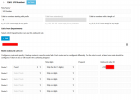
I've set this up in the outbound rule of my new 3CX SMB, but it fails to dial out. It just says it could not connect the call.

Screenshot of my setup below.

Any help would be massively apricated.
1745319200291.png
 
Do you have an actual error or tcpdump to analyze for further advice?
 
The only error that i have is that in the Call Log it says "No Route Exists" but to me i can't see what the issue is, as i have a route there by using the prefix of 9.

1745394397012.png
 
check if there are any outbound rules on top of this that are more general or try placing this rule on top of the rest and test.
 
check if there are any outbound rules on top of this that are more general or try placing this rule on top of the rest and test.
The only other rule that I have that is above this is the Trunk rule for my Fuse2 trunk that allows any number to be dialled out.

1745395219834.png
 
check if there are any outbound rules on top of this that are more general or try placing this rule on top of the rest and test.
Just tried deleting all my rules and doing the Prefix ones above the standard Trunk rule, that worked.

Strange how it cant detect the Prefix if its below the standard Trunk rule. Thanks for your help (This can be marked as solved)
 
Think of 3CX’s rule list like the bouncers at a club:

First Bouncer (1st Line: Super-Picky VIP)
– This guy only lets in the exact few folks on the VIP list (e.g. calls from Mrs. Smith’s cellphone at exactly 7:03 AM).
– If your call matches his tiny, laser-focused rule, you’re in and he stops everything else.

Second Bouncer (2nd Line: Regular VIPs)
– A little more chill—he’ll admit anyone on the “nice list” (say, calls from all your sales team extensions).
– He still checks against a fairly tight rule set before passing you along.

Last Bouncer (Last Line: General Admission)
– The “everybody-else” line. No fancy criteria here—if you don’t fit those VIP rules, you go through this open gate.
– Think “if you’ve somehow slipped past the first two bouncers, you get in here.”

So:

Top of the list (1st rule) = the pickiest bouncer, only the most specific matches pass.

Middle of the list (2nd rule) = still picky, but broader.

Bottom of the list (last rule) = the catch-all “come one, come all” entrance.

Rule priority in 3CX is just like lining up increasingly relaxed doormen—if you don’t match the first, you roll on to the next, until someone finally lets you in.
 
  • Like
Reactions: fxbastler
That's an awesome example thanks a lot. Will definitely keep that in mind when i do more rules
 
Just to make it a lot easier on everyone, whenever 3CX processes any type of rule, it is always a FIRST matching.

As you had the department matching on the 1st rule it didnt go to the next one.
 
Also, with a dedicated instance of 3CX this would have been a simple selection of your rule and use the "Move up" button.
 
Status
Not open for further replies.

Members Online Now

Forum statistics

Threads
111,831
Messages
589,277
Members
164,660
Latest member
RJenkinsROCK