Disable Android/IOS App Download option in New Windows Client V18

Status
Not open for further replies.

Rashid Raza

New User
Joined
Aug 20, 2020
Messages
134
Reaction score
23
Dear 3cx Team,

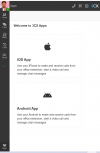
How can we Disable Apps Button in the New 3cx Client as we don't want our users to configure 3cx on mobile?

3cx V18 Client.PNG
 
The buttons within the 3CX Webclient and 3CX Desktop App for the 3CX Android and 3CX iOS Apps are merely links to the Play Store and App Store respectively. If they manually go into the Play/App Store they can simply search for 3CX and they will get the same results. Installing the app does not mean they will also provision their extension too.

However, that said, they can use the QR code to provision it, and the QR code does exist in the 3CX Webclient, so the most you can do is block the 3CX Tunnel and PUSH for those extensions. This will prevent the 3CX Mobile clients from making and receiving calls. They will still be able to provision and view presence information but this is all they'll be able to do.

• The 3CX Tunnel can be disabled from "Extensions >> Edit >> Options": "Block Remote Tunnel Connections..."
• PUSH can be disabled from "Extensions >> Phone Provisioning >> 3CX App": " Enable PUSH for smartphones"
 
@ChrisC_3CX Thanks for your reply.

Can you please confirm if the 3cx Tunnel Disabled will 3cx Client work for Out of Office Settings without any issue?
 
To first clarify a few things:

...will 3cx Client work...
Which 3CX App are you referring to exactly(3CX iOS/Android, 3CX Windows, 3CX Webclient, etc)? If you're referring to the 3CX Desktop App(shown in your screenshot) then the answer is no, it will not be affected as it does not use the 3CX Tunnel to connect to the 3CX PBX when it's remote nor when it is local to the PBX.

...for Out of Office Settings...
By this do you mean a 3CX App that is remote to the 3CX PBX(Not on the same LAN)?


Disabling the 3CX Tunnel for an extension will affect anything using the 3CX Tunnel that has that extension provisioned. This includes 3CX Apps such as the 3CX Mobile Apps(iOS/Android) and the 3CX Windows App, and IP Phones provisioned via the 3CX SBC. The new 3CX Desktop App included in v18 does not use the 3CX Tunnel and will therefore stay unaffected.
 
Hi @ChrisC_3CX
Our Users have 3cx IP Phone's, Mobile Apps, and Windows Apps as well.
As per the picture attachment sent above when the user clicks on IOS or Android button it shows a QR code for that extension and we don't want to allow users to provision extension on mobiles without Admin Concern. (Only IT admin can do so)
Blocking the remote tunnel connections blocks the IP Phones and mobile apps connectivity and we don't want that.
The required feature is to Disable the APPS button from the New 3cx WIndows App.
 
The Windows App(NOT the Desktop App) will indeed be affected and so will the IP Phones if they are provisioned with a 3CX SBC. That said, there's no other way to prevent them from using the 3CX Mobile apps without affecting the mentioned 3CX endpoints too. You could perhaps disable PUSH notifications though this will only prevent them from receiving incoming calls. They will still be able to make calls.

The required feature is to Disable the APPS button from the New 3cx WIndows App.
Only disabling the APPs button will not be enough as users will still be able to resend the Welcome email themselves or find the QR code from within "Settings >> Scan QR Code". You might have a quick look in our Ideas Section to see if anyone else posted anything similar as a feature request and upvote it to help push it up the list. If you can't find anything, you could maybe ask one of our partners with the necessary permissions to post this on your behalf.
 
Status
Not open for further replies.

Forum statistics

Threads
112,349
Messages
592,027
Members
165,513
Latest member
megalmazan