- Joined
- Oct 13, 2022
- Messages
- 3
- Reaction score
- 1
Hello,
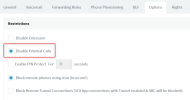
Since this option of "Disable outbound calls outside office hours" removed from admin console and moved to webclient we do not seems to have it set correctly.
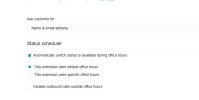
In the webclient the option now can be found under Admin > Users > (Select a User) > then under "Status scheduler"
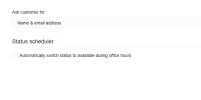
But to se the option "Disable outbound calls outside office hours" to enabled, you have to first enable the "Automatically switch status to available during office hours" so you can view the other option and enable it. But in this case the user status will change out of office hours.
Note that I tried to enable the sub option "Disable outbound calls outside office hours", then save the settings, then again disable "Automatically switch status to available during office hours" thinking that even if the other option is hidden it will remain active, but no, it disables it as well.
How can we just disable outboud calls outside office hours without having the user to change status automatically?
Since this option of "Disable outbound calls outside office hours" removed from admin console and moved to webclient we do not seems to have it set correctly.
In the webclient the option now can be found under Admin > Users > (Select a User) > then under "Status scheduler"
But to se the option "Disable outbound calls outside office hours" to enabled, you have to first enable the "Automatically switch status to available during office hours" so you can view the other option and enable it. But in this case the user status will change out of office hours.
Note that I tried to enable the sub option "Disable outbound calls outside office hours", then save the settings, then again disable "Automatically switch status to available during office hours" thinking that even if the other option is hidden it will remain active, but no, it disables it as well.
How can we just disable outboud calls outside office hours without having the user to change status automatically?