- Joined
- May 29, 2019
- Messages
- 25
- Reaction score
- 4
Hello,
When calls come in to our busines, I would like the LCD screens on deskphones to display INBOUND RULE : CALLERS NUMBER.
By default, what I see is CALLERS NUMBER : INBOUND RULE NAME : NAME OF CALL QUEUE ROUTED TO.
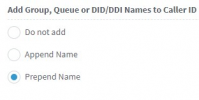
After searching the forum, I found a suggestion to go to Advanced -> Contacts -> Options and under the section Add Group, Queue or DID/DDI Names to Caller ID, change it from "Append Name" to "Do not Add".
But when I do this, my screens now only displays: CALLERS NUMBER.
Can anyone point me in the direction of the relevant part of the documentation, or even if possible exactly how to achieve my desired result of disaplying INBOUND RULE : CALLERS NUMBER?
Thanks in advance
When calls come in to our busines, I would like the LCD screens on deskphones to display INBOUND RULE : CALLERS NUMBER.
By default, what I see is CALLERS NUMBER : INBOUND RULE NAME : NAME OF CALL QUEUE ROUTED TO.
After searching the forum, I found a suggestion to go to Advanced -> Contacts -> Options and under the section Add Group, Queue or DID/DDI Names to Caller ID, change it from "Append Name" to "Do not Add".
But when I do this, my screens now only displays: CALLERS NUMBER.
Can anyone point me in the direction of the relevant part of the documentation, or even if possible exactly how to achieve my desired result of disaplying INBOUND RULE : CALLERS NUMBER?
Thanks in advance