- Joined
- Nov 24, 2024
- Messages
- 4
- Reaction score
- 1
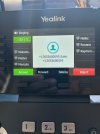
I am using a Yealink T54W phone connected to a 3CX system, and I have two lines configured on the device. When receiving a call, both lines ring, but I cannot determine which line the call is coming from. This is critical for handling calls appropriately based on the source (Line 1 or Line 2).
I need a way to:
1. Identify visually on the phone's display which line is ringing (e.g., show "Line 1" or "Line 2").
2. Optionally, differentiate the lines using unique ringtones.
3. Alternatively, configure BLF (Busy Lamp Field) keys to indicate the ringing line.
Steps Already Taken:
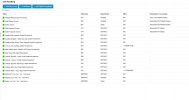
Configured the two SIP accounts with distinct extensions in 3CX.
Updated the Yealink firmware to the latest version supported by 3CX.
Checked the phone settings for BLF and distinctive ringtone options.
Questions:
1. How can I configure the Yealink T54W to show which line is ringing on the display?
2. Is it possible to assign distinctive ringtones to different lines via the 3CX console or phone settings?
3. Can BLF keys be used to monitor ringing lines on the T54W, and if so, how do I set them up?
4. Are there additional steps in the 3CX Management Console or Yealink phone interface to achieve this?
I appreciate any guidance or detailed steps to resolve this issue. Thank you!
I need a way to:
1. Identify visually on the phone's display which line is ringing (e.g., show "Line 1" or "Line 2").
2. Optionally, differentiate the lines using unique ringtones.
3. Alternatively, configure BLF (Busy Lamp Field) keys to indicate the ringing line.
Steps Already Taken:
Configured the two SIP accounts with distinct extensions in 3CX.
Updated the Yealink firmware to the latest version supported by 3CX.
Checked the phone settings for BLF and distinctive ringtone options.
Questions:
1. How can I configure the Yealink T54W to show which line is ringing on the display?
2. Is it possible to assign distinctive ringtones to different lines via the 3CX console or phone settings?
3. Can BLF keys be used to monitor ringing lines on the T54W, and if so, how do I set them up?
4. Are there additional steps in the 3CX Management Console or Yealink phone interface to achieve this?
I appreciate any guidance or detailed steps to resolve this issue. Thank you!