Solved Divert to external number comes up not found

Status
Not open for further replies.

davidsimcox

Premier Customer
Joined
Feb 11, 2021
Messages
19
Reaction score
3
I have set up on inbound rules
The destination for calls outside office hours
Forward to outside number xxxxxxxxxxx

I have tried is with 00, +44, 44 and without and prefix all state Not found when the number is dialled

However, if I change this to on an extension it dials the extension no problem or a voicemail

If I also tried calling the number from the same group it works with no problem dialling out

What am I missing to set up a forward to outside number

We need to know how to do this in case say our internet goes down and we need to divert to a mobile also during office hours
 
3CX Version, Professional Annual 16.0.1078
Server OS, Debian GNU/Linux 9.13 (stretch),4.9.0-13-amd64
Is the 3CX Server Hosted Google Cloud
Trunk Provider Gradwell Communications
Has the Firewall Checker passed: YES
Are custom Phone Templates being used: NO

Dialling the external number from an extension directly works

Dialling the inbound number works if i assign it to an extension

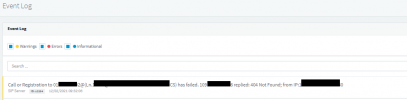
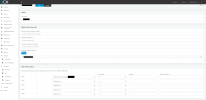
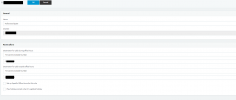
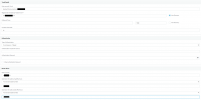
attached is images of settings and also an error shown
 

Attachments

  • eventlog.png
    eventlog.png
    11.4 KB · Views: 10
  • outbound.png
    outbound.png
    69.6 KB · Views: 10
  • inbound.png
    inbound.png
    19 KB · Views: 9
  • trunk.png
    trunk.png
    34.4 KB · Views: 8
Try creating an additional Outbound rule exactly as shown below:
1613123470845.png


Move the Outbound Rule to the very top of the list.

If the calls still fail, check the following:

1. In SIP Trunks >> Edit Gradwell >> Outbound Parameters, Are the "From: Display Name" and "From: User Part" set as follows:
1613123607749.png
2. If yes, go to
Extensions >> Edit the extension from which direct calls to the number work >> General >> check the Outbound Caller ID field.
Check if it is the same value as in SIP Trunks >> Edit Gradwell >> Caller ID >> Configure Outbound Caller ID.
If not, copy whatever is in the Extension's Caller ID field into the SIP Trunks Caller ID field and try again.
 
Top part fixed this issue thank you
 
  • Like
Reactions: NickD_3CX
Glad to hear it, just bear in mind however that this was only in order to identify the cause. Now that we know that the issue was related to the Outbound Rule configuration, I highly recommend that you go through our training material which covers this so that you can adjust your Outbound Rules accordingly:
https://www.3cx.com/3cxacademy/videos/advanced/configuring-outbound-routing/
Slide 6 and on.

I do not recommend leaving the configuration as is, since now all outbound calls will be matched with that rule which essentially has no restrictions.

Note: Also, do bear in mind that you can also sign up for for our free webinars. You can find these on the right hand side of our forums.
 
Status
Not open for further replies.

Forum statistics

Threads
111,974
Messages
590,081
Members
164,899
Latest member
mazet