DNS error / FQDN - trunk wont register

georgi0

Free User
Joined
Feb 14, 2017
Messages
41
Reaction score
1
Hi there.

My firewall checks are ok but my trunk can't connect with the below settings.
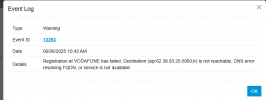
I get this error.


1749196011798.png

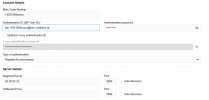
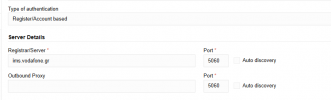
My trunk has these settings

1749196136765.png

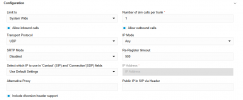
and also:

1749196163613.png


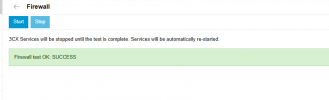
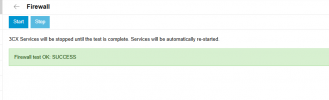
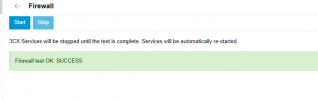
and my firewall

1749196208427.png

could anyone please advise what the issue could be?

thank you.
 

Attachments

  • 1749196248653.png
    1749196248653.png
    5.7 KB · Views: 3
Registrar is wrong or offline... I am sure there should be an dns name and not an ip address
 
Registrar is wrong or offline... I am sure there should be an dns name and not an ip address

thank you for the message.

as soon as i enter the name (instead of an IP), i dont get any activity from 3CX for even trying to connect.

1749200538047.png


it's like no attempts are made for a connection..

1749200637654.png
 
Where is your pbx installed? Firewallcheck is ok?
 
Where is your pbx installed? Firewallcheck is ok?
on-premise debian dedicated pc, and to me it looks like all checks are passed

1749201163714.png
 
the provider will change my modem/router and then i will recheck. for the momment there is nothing else i can do probably
 
Vodafone GR is not a supported provider so I don't know the exact settings but your authentication ID looks wrong to me.
Also the ims.vodafone.gr does not resolve to anything so you might want to use that as the registrar and the IP you have as a proxy.
Ultimately though you need to contact your provider and ask for instructions on what to use and where or use a supported provider that we know how it works so we can assist more.
 
  • Like
Reactions: Evolute IT
I think once I have the modem replaced the issues will resolve. Zte from Vodafone can not have its firewall disabled and although my router is in DMZ mode with the Vodafone modem some aspects are cut from zte modem.

Like it did when I successful did the same with Cosmote sip trunk using their oxygen modem.

i also found out that ims.Vodafone gr does not engage registration but when you put thei server ip as in my first screenshots above it works

Thank you Yannis.

Hope in the future 3CX provides default trunks for the Greek market as well on all major 3 telecommunication providers
 
OK new modem received but still nothing registers. I believe I know why. The equipment from Vodafone make another VLAN (besides the one for internet) which gives you another WAN address IP and thought this VLAN the SIP should work if you use their sip server ims.vodafone.gr

no matter what effforts I make directly from inside the generic trunk in 3CX to register via this ims.vodaonfe.gr nothing goes through nor it is traceable or you can ping it. It makes sense, they are working differently than Cosmoteand others.

so the idea now, is to enable their modem again for obtaining a WAN address for telephony only and then I will enter the LAN IP address of the modem from Vodafone inside the SIP trunk I created in 3CX. hopefully this will route all traffic via this VLAN / modem / method and the call will go through.

anyone who have succeeded in this method please input your feedback.
I am now 3 weeks without a PBX and they can't help me as their support is limited even for business users.

thanks
G
 
Hi G, just a quick comment. What you describe sounds like quite a specialized config that your SIP trunk provider is demanding.
If I understand correctly, you have special ISP service provided by the SIP carrier and must use their modem hardware for ISP to have ability to connect to their SIP server ( ims.vodafone.gr ) via special private VLAN. (?)

Can you please confirm if this is correct, and maybe you can describe how you have your ISP<>Firewall<>3cx connectivity toplogy in place at your site. For example is this ISP also your primary office-site ISP connection, or a secondary/alternate / or just dedicated exclusively for your 3cx host to get its internet and SIP trunk connectivity?

(As a sanity test - I tried to ping to ims.vodafone.gr from my home office / normal DNS lookup and it fails, so I am guessing there is as you say - some non-public aspect to access to this sip host. Since normally if a sip trunk provider has a SIP server with name SipServer.ProviderName.Com then it can be ping/resolved via DNS - from anywhere on the internet - in theory / generally.)

For proper operation your 3cx instance will need to be accessible to public internet / and to have access to public internet. (ie, 3cx softphones on roaming smartphones/laptops - will talk to your 3cx via its public FQDN <> and this expects-demands public connectivity Internet for your 3cx). and also for your 3cx to work correctly on various services (ie, Email notification relay, SSL cert renewal, etc) - all these things will require that 3cx instance has normal-good internet access. So it could be you are in a bit of a catch-22 with this SIP service provider, if they demand you use their private network connectivity for SIP trunk access.

Maybe? if your SIP provider - special ISP modem-service - is giving access to both the sip server ( ims.vodafone.gr ) and also public internet correctly - you can either use this constrained-special service only for your 3cx host - or if it is 'part of your office firewall topology' you maybe looking at a situation of needing special config on your firewall for custom routing (Ie, in the scenario of - you have 2x different WAN IP address from this ISP, one is for regular-internet-traffic and the second IP is inside a VLAN for special SIP server connectivity) - in that scenario you will need to setup special config on your firewall to (effectively) state something like "all outbound traffic from 3cx LAN IP address <> going to ims.vodafone.gr <> must route out via WAN.VLAN.IP.Interface and not WAN.public.IP.interface - or something lovely like that

ie, this feels significantly more complicated than a normal setup where the SIP traffic is not required to use special network requirement like this, ie, generally most SIP providers have their service open to traffic on public internet.

Anyhow. Possibly you might clarify a bit more the scenario you are trying to move along and it may be possible to provide a bit of help/suggestions that are more meaningful. But this is definitely a challenging config from what info you provide so far.


Tim
 
You will need to add a new physical or virtual interface to the debian server, and a static route or two. This would limit your support options but should get the specific sip trunk working.
 
You will need to add a new physical or virtual interface to the debian server, and a static route or two. This would limit your support options but should get the specific sip trunk working.
Hi

Can you please advice how to do this ?
where should i enter the static route? to the vodafone (provider) modem/router? pointing to my 3CX IP installation?

thanks
 
Hi G, just a quick comment. What you describe sounds like quite a specialized config that your SIP trunk provider is demanding.
If I understand correctly, you have special ISP service provided by the SIP carrier and must use their modem hardware for ISP to have ability to connect to their SIP server ( ims.vodafone.gr ) via special private VLAN. (?)

Can you please confirm if this is correct, and maybe you can describe how you have your ISP<>Firewall<>3cx connectivity toplogy in place at your site. For example is this ISP also your primary office-site ISP connection, or a secondary/alternate / or just dedicated exclusively for your 3cx host to get its internet and SIP trunk connectivity?
It's primary. I can use their user name password to login for internet either with their modem or directly in my grandstream GS7000 router which makes the POE dial on its own
(As a sanity test - I tried to ping to ims.vodafone.gr from my home office / normal DNS lookup and it fails, so I am guessing there is as you say - some non-public aspect to access to this sip host. Since normally if a sip trunk provider has a SIP server with name SipServer.ProviderName.Com then it can be ping/resolved via DNS - from anywhere on the internet - in theory / generally.)

For proper operation your 3cx instance will need to be accessible to public internet / and to have access to public internet. (ie, 3cx softphones on roaming smartphones/laptops - will talk to your 3cx via its public FQDN <> and this expects-demands public connectivity Internet for your 3cx). and also for your 3cx to work correctly on various services (ie, Email notification relay, SSL cert renewal, etc) - all these things will require that 3cx instance has normal-good internet access. So it could be you are in a bit of a catch-22 with this SIP service provider, if they demand you use their private network connectivity for SIP trunk access.
Yes this is the case i am afraid .
Maybe? if your SIP provider - special ISP modem-service - is giving access to both the sip server ( ims.vodafone.gr ) and also public internet correctly - you can either use this constrained-special service only for your 3cx host - or if it is 'part of your office firewall topology' you maybe looking at a situation of needing special config on your firewall for custom routing (Ie, in the scenario of - you have 2x different WAN IP address from this ISP, one is for regular-internet-traffic and the second IP is inside a VLAN for special SIP server connectivity) - in that scenario you will need to setup special config on your firewall to (effectively) state something like "all outbound traffic from 3cx LAN IP address <> going to ims.vodafone.gr <> must route out via WAN.VLAN.IP.Interface and not WAN.public.IP.interface - or something lovely like that
No they do not offer another solution. Either their modem router and get telephony from their device ports or try on your own...
ie, this feels significantly more complicated than a normal setup where the SIP traffic is not required to use special network requirement like this, ie, generally most SIP providers have their service open to traffic on public internet.

Anyhow. Possibly you might clarify a bit more the scenario you are trying to move along and it may be possible to provide a bit of help/suggestions that are more meaningful. But this is definitely a challenging config from what info you provide so far.


Tim
Hi Tim and thank you for the post.

Yes this is the sitauton as you described it.

I tried over the weekend to connect the prodiver modem/router which got a VLAN with seperate IP for the VOIP and then madd some test in 3cx to enter the IP of their modem as registar server. I had no luck, i dont know even if 3CX can see the providers modem/router.

I am not also very tech efficient, more like a hobbiest. On providers VOIP / phone 2 portts whenever i connect a phone it rings.

The provider does not give any other method via sip trunk to connect aaprt from their ims.vodafone.gr which cant be traced outside their network so it needs a VLAN first.

I am almsot 4 weeks now with PBX service about to go crazy.

George
 
Hi George, thanks for the added information.

So - this config is inherently a bit of a challenge compared to a 'regular, simpler' deployment - I am not sure if you have possible option to seek support (ie, pay 3cx, or a partner) to help with moving this along. I did a bit more gentle digging via google search,

a few relevant hits pop up in the forums, for example

https://www.3cx.com/blog/docs/network-configurations-supported-3cx-phone-system/
and

the first link is focused on windows networking 3cx config but is still informative even if you have a linux-based 3cx instance, I believe

Broadly speaking I think your choices remain the same,

probably the simplest config

assuming your SIP carrier wants you to use their ISP service only for SIP traffic. And you have a different ISP at your site for normal internet traffic.

1) you need dual physical NIC in your 3cx instance, the primary NIC will have standard LAN config and default gateway to internet is on this interface. Then second NIC will be cabled directly to the device from VOIP_provider which gives an IP in their ISP/VLAN/network. And you need to tweak config in your 3cx related to your trunk, telling it to use the secondary NIC for this SIP traffic

or more fiddley, requires firewall expertise and being familiar with your firewall at your site
2) you have dual-wan on your firewall, both are active concurrently, primary WAN is with main-internet-ISP-service-provider and is default for all traffic. second-WAN interface is attached to the ISP_modem_Device and has access (only) to the SIP Trunk server. as a baseline you have this attached, and may successfully ping to the IP address or FQDN of the special SIP Trunk Server. If you can't get this in place as baseline, you are done/dead in the water. Once you have this in place, your second config task would be to put in place a specialized firewall rule which (more or less) must designate "Outbound traffic to SIP_SERVER which originates from (3cx_SERVER_LAN_IP_ADDRESS) must route out via WAN2 not WAN1. But to be honest this config is delicate and fiddley, your better path to success probably is to do this on your 3cx host (only) and not at all on your firewall.

In terms of testing (simpler route - option one) - all I can suggest as an initial validation step.
use a simple controlled test. For example, a laptop or desktop computer. With connection only to outside world via (Modem?Device your SIP trunk provider has given you) - I still don't know if this is a DSL unit or something else - end of the day it does not really matter. Your 'easy control test case' - you just *must* be able to get the link up to the VOIP_ISP network, and then ping successfully to their SIP server FQDN. Then take note of output from a 'traceroute' for reference, and write down some info about what your IP address is, just so you know. Optionally you can use some simple SIP_CLIENT agent software on your TEST_MACHINE to validate "hey can I actally make a SIP Connection from this device, to their SIP_SERVER with actual success?"

once you have this tested and working in a 'simplest use case' you are in a better position to believe you have maybe some chance of success in configuration of dual-interface settings on your 3cx instance / which can in theory do what you want with very careful attention to detail, reading the documentation, and proceeding carefully.


Tim
 
  • Like
Reactions: Saky
Hello Tim

thanks for your support, this is probably too much for my as i do not have so much knowledge to alter firewalls.
After all this period i still have not found a way to make it work. The provider needs from me as you said it to route all VOIP via a second card or VLAN with id 837 as it is the case here in greece for Vodafone.

I have a GWN7000 router from grandstream which can do all these but i do not know how to set it up correct.
Also another issue i have is that my 3CX all these years was set to same IP musk and subnet as my local network and i cant alter the 3CX network IP address or i do not know how.

anyway if you think you can guide me to find a solution somwhere let me know and again thanks so much for taking the time.

George
 

Members Online Now

No members online now.

Forum statistics

Threads
111,832
Messages
589,286
Members
164,662
Latest member
DejanMDS