Do we require SBC (Additional) for the integration of 3cx with the team?

Status
Not open for further replies.

srane.sushant

Silver Partner
Advanced Certified
Joined
Feb 25, 2020
Messages
78
Reaction score
11
The 3CX becomes the "SBC" for Teams itself.

You need an A record, an SSL certificate and the scripts that 3CX generates.
 
  • Like
Reactions: N_G
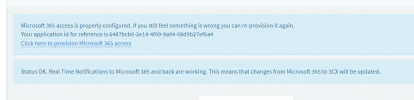
Follow all the above but still status is the same.

On 3cx it says all OK

1699451565819.png

even accounts are showing active on 3cx.

1699451715766.png
But still SBC on teams is not active.
 
It can take up to 24h to fully update on the Teams side.

Make sure your SSL is valid and one of the authorized roots by Microsoft. Also, check that you didn't use a wildcard cert, as those won't work.
 
1699606714121.png

Which should I buy?

My 3cx is stg53.3cx.ae and on Microsoft is stg53.com and I am generating SSL as teams.stg53.com will it work?
 
Last edited:
Can someone help me to generate CSR in 3cx hosted on Linux?
 
Finally, all sorted. To generate CSR use the following command connecting to 3cx. I used Putty

  1. Install OpenSSL:If you don't have OpenSSL installed, you can install it using the following command:
    bashCopy code
    sudo apt-get update
    sudo apt-get install openssl
  2. Generate the CSR and Private Key:Run the following command to generate a new private key and a CSR:
    bashCopy code
    openssl req -new -newkey rsa:2048 -nodes -keyout yourdomain.key -out yourdomain.csr
    Replace yourdomain with the actual domain name for which you are generating the CSR.
    • -new: This option specifies that a new CSR is to be generated.
    • -newkey rsa:2048: This specifies the type and size of the private key.
    • -nodes: This option specifies that the private key should not be encrypted with a passphrase. If you want to secure your private key with a passphrase, omit this option.
    • -keyout yourdomain.key: This option specifies the filename to write the newly created private key to.
    • -out yourdomain.csr: This option specifies the filename to write the CSR to.
  3. Fill in the CSR Information:You will be prompted to enter information for the CSR. The most important field is the Common Name (CN), which should be the fully qualified domain name (FQDN) for your server.
  4. Verify the CSR:You can view the content of the CSR using the following command:
    bashCopy code
    openssl req -in yourdomain.csr -noout -text
    Verify that the information is correct, especially the Common Name.
Now, you have the CSR (yourdomain.csr) and the private key (yourdomain.key). You can use the CSR to request a certificate from a Certificate Authority (CA). Make sure to keep your private key secure, as it is used to decrypt the information encrypted with the public key in the certificate.

Once this is done. Please ensure to update the telephone number in 365 as well as in 3cx.

Thanks all for help.
 
Status
Not open for further replies.

Members Online Now

Forum statistics

Threads
111,832
Messages
589,285
Members
164,662
Latest member
DejanMDS