Download archive version

Status
Not open for further replies.

BW~Merlin

Forum User
Joined
Apr 6, 2019
Messages
28
Reaction score
0
Hi, I am trying to help someone out troubleshooting an issue with their 3CX install and I wanted to spin up a fresh install on a new machine and restore from backup. The problem is that I can only find download links for version 16.0.8.9 but the backups are from version 16.0.8.16.

Is there somewhere I can download specific versions of 3CX for Windows to be able to restore this backup?
 
Can you not click to update it once its up?

Also note that when you restore the backup, your IP will get connected to the FQDN which could potentially break their access/calls.
 
Can you not click to update it once its up?

Also note that when you restore the backup, your IP will get connected to the FQDN which could potentially break their access/calls.
Was hoping to restore during the setup process rather than afterwards.

Currently troubleshooting an issue where SIP calls are plain broken. SIP provider is point to firewall (and I have to take the word of the person I am helping) nothing has changed. Tried allowing all from the 3CX server outbound but still failing firewall check.

Is it easy to change back and forth between IP and have the FQDN update?
 
Backup and restoring elsewhere seems a bit drastic for your first steps in troubleshooting.

Please provide this info https://www.3cx.com/community/threads/information-to-provide-when-requesting-help.67558/

What is the firewall?

I would start by getting the 3CX firewall checker to pass before you're sure its not the firewall.
The firewall is a Smoothwall. They have already been in contact with support who are blaming the SIP provider and SIP provider is blaming firewall. The error message in 3CX is that the address 103.214.206.105:5060

SIP Server/Call Manager ID: 12293 DNS error resolving FQDN, or service is not available.​


When I did this 3CX install a couple of years back everything was working. Something somewhere has changed and I have been asked to help troubleshoot. There is a second "backup" SIP trunk from a totally different provider which is working (tested making an extension, assigning the DID on this second trunk, installing the web extension and then dialling the DID and the call went through) so I am in favour of the issue being the SIP provider especially in light of the above error message (I tried a couple of reverse DNS websites and none were able to resolve that IP into an address).

  • 3CX Version, 16.0.8.16
  • Server OS, Windows Server 2019
  • Is the 3CX Server Hosted and where? On-premises
  • IP Phone Make/Model/Firmware version, e.g. Yealink T19 E2
  • Provisioning Method: Local (I think)
  • Trunk Provider or VoIP Gateway Make/Model, Alloy Voice SIP-Trunk
  • Has the Firewall Checker passed: NO
  • Are custom Phone Templates being used: NO
 
Obviously, first thing to point out is your 3CX is outdated so i would recommend this is upgraded.

What are the symptoms?

Is it every call?

Have you tried re-creating the SIP trunk?

Are you able to capture the problem on a wireshark capture?

Is your SIP set up with FQDN or IP?
 
AlloyVoice currently resolves to these IPs so the error might not be from them:

sip.alloyvoice.com.au. 900 IN A 103.26.173.68
sip.alloyvoice.com.au. 900 IN A 103.26.173.4
sip.alloyvoice.com.au. 900 IN A 103.26.174.36
sip.alloyvoice.com.au. 900 IN A 103.26.174.4
sip.alloyvoice.com.au. 900 IN A 103.26.173.36

Also if you are failing to pass the firewall checker when all ports are open is an issue you should resolve first before moving on to the next thing.
When you are saying calls are broken what exactly do you mean? Broken audio or not connecting at all? Does it affect both inbound and outbound calls?
 
Obviously, first thing to point out is your 3CX is outdated so i would recommend this is upgraded.

What are the symptoms?

Is it every call?

Have you tried re-creating the SIP trunk?

Are you able to capture the problem on a wireshark capture?

Is your SIP set up with FQDN or IP?
We will try and update and see how we go.
Symptoms are no incoming or out going calls
Haven't tried to recreate the trunk but it is on my to do list (I don't want to re-setup all the inbound rules if I can avoid it).
I am not experienced enough to read wireshark captures but I know that captures have been taken.
The SIP trunk is using a FQDM. I have asked if there is a client portal that they can check to ensure that the details haven't changed.

AlloyVoice currently resolves to these IPs so the error might not be from them:

sip.alloyvoice.com.au. 900 IN A 103.26.173.68
sip.alloyvoice.com.au. 900 IN A 103.26.173.4
sip.alloyvoice.com.au. 900 IN A 103.26.174.36
sip.alloyvoice.com.au. 900 IN A 103.26.174.4
sip.alloyvoice.com.au. 900 IN A 103.26.173.36

Also if you are failing to pass the firewall checker when all ports are open is an issue you should resolve first before moving on to the next thing.
When you are saying calls are broken what exactly do you mean? Broken audio or not connecting at all? Does it affect both inbound and outbound calls?
Now that is interesting. I wonder why the 3CX console is showing another IP address. It might be that Alloy changed or uses a different IP address for customers etc.
Unsure how to get the firewall checker to pass when everything is open. I know it bases the DNS checks and then bombs out on the SIP AGL (SIP support isn't enabled on the firewall and the firewall is running the latest updates as of November last year).
Both inbound and outbound calls are failing.
 
I wonder why the 3CX console is showing another IP address.
Where exactly are you seeing this IP(103.214.206.105:5060)? Can you show the full error?

The fact that it's different for you is not necessarily an issue as it might actually be by design.

I know it bases the DNS checks and then bombs out on the SIP AGL
Can you run the firewall checker again and provide a screenshot(s) of the results? What exactly do you see?

Also, can you check if you're using this exact hostname for the SIP Provider?
 
Where exactly are you seeing this IP(103.214.206.105:5060)? Can you show the full error?
In the 3CX console (sorry no longer have access but pretty sure it was the main page as well as the log file section).
The fact that it's different for you is not necessarily an issue as it might actually be by design.
I think so, the SIP trunk details don't use sip.alloyvoice.com.au but rather a different sub domain which appears to have a different IP address attached to it.
 
Have you ran the firewall checker again? What exact errors did you get and where? The firewall checker is what you must absolutely get out of the way first as there would be no point in investigating further if it is not passing 100%.


Only consider the below IF the firewall checker passes completely and you still have issues:
In the 3CX console (sorry no longer have access but pretty sure it was the main page as well as the log file section).

I think so, the SIP trunk details don't use sip.alloyvoice.com.au but rather a different sub domain which appears to have a different IP address attached to it.
The 3CX default template for AlloyVoice actually uses sip.alloyvoice.com but this is of course for 3CX V18.

That said, re-creating the SIP Trunk as @kieferschild recommended would make more sense if you first upgraded to v18 but I still do recommend trying this anyway as it would be much faster than going through the upgrade procedure. Make sure to copy all account specific details before deleting the old one (Registration credentials, etc) so that you can then use them on the new one.

Do not change anything on the on the SIP Trunk such as the Registrar, port configuration, etc, leave them all on their default settings and check if fixed.
 
Have you ran the firewall checker again? What exact errors did you get and where? The firewall checker is what you must absolutely get out of the way first as there would be no point in investigating further if it is not passing 100%.
Firewall checker still fails. Is there a list of IP's/domains with ports that the firewall checker uses that could be passed onto the ISP to see if they are doing something with traffic going to/from those addresses?

Currently they have their ISP to do a bypass of the firewall for SIP traffic so the trunk is backup but the firewall check is still failing.

As they haven't reached out to me again for further assistance going to have to shelve this for now.
 
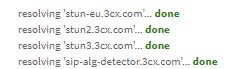
The IPs are not static so I'm afraid I can't provide a list. You can make sure traffic to the stun servers configured in your PBX is allowed though. To see which ones are used just run the firewall checker again and you should see them on the top:
1644831374683.png

Note: Remember the SIP ALG detector server too.

Yours might be different so check and then run DNS lookup to determine the IPs. Bear in mind that additional IPs are tested during the firewall checker but you could find them easily by running a packet capture on the server while running a test. They might not be always the same so you might have to do this a couple of times to get a more concise list. You can have a look at this guide explaining how the test is performed so that you can tell what you are looking for in the packet capture: https://www.3cx.com/docs/firewall-checker/

The port check is on default stun port which is UDP 3478, but, again, additional ports might be used.

The additional ports and IPs are used in what's referred to as Test 2 in the guide I provided a link to. You'll most probably get a "Full cone NAT test" failed if those are the only ones that are blocked.
 
Status
Not open for further replies.

Forum statistics

Threads
111,974
Messages
590,083
Members
164,901
Latest member
Silent_Guru